What is the AWS Serverless Application Model (AWS SAM)?
To Nha Notes | Oct. 11, 2023, 9:42 a.m.
The AWS Serverless Application Model (AWS SAM) is a toolkit that improves the developer experience of building and running serverless applications on AWS. AWS SAM consists of two primary parts:
-
AWS SAM template specification – An open-source framework that you can use to define your serverless application infrastructure on AWS.
-
AWS SAM command line interface (AWS SAM CLI) – A command line tool that you can use with AWS SAM templates and supported third-party integrations to build and run your serverless applications.
Here’s an example of a basic serverless application. This application processes requests to get all items from a database through an HTTP request. It consists of the following parts:
-
A function that contains the logic to process the request.
-
An HTTP API to serve as communication between the client (requestor) and the application.
-
A database to store items.
-
Permissions for the application to run securely.
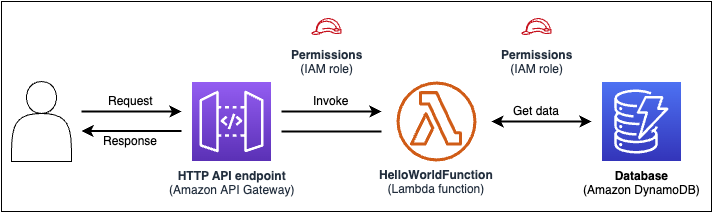
In 23 lines of code, the following infrastructure is defined:
-
A function using the AWS Lambda service.
-
An HTTP API using the Amazon API Gateway service.
-
A database using the Amazon DynamoDB service.
-
The AWS Identity and Access Management (IAM) permissions necessary for these services to interact with one another.
To provision this infrastructure, the template is deployed to AWS CloudFormation. During deployment, AWS SAM transforms the 23 lines of code into the AWS CloudFormation syntax required to generate these resources in AWS. The transformed AWS CloudFormation template contains over 200 lines of code!
Benefits of using AWS SAM
Here are some examples of what you can accomplish with AWS SAM:
Define your application infrastructure code quickly, using less code
Author AWS SAM templates to define your serverless application infrastructure code. Deploy your templates directly to AWS CloudFormation to provision your resources.
Manage your serverless applications through their entire development lifecycle
Use the AWS SAM CLI to manage your serverless application through the authoring, building, deploying, testing, and monitoring phases of your development lifecycle. For more information, see Using the AWS SAM CLI.
Quickly provision permissions between resources with AWS SAM connectors
Use AWS SAM connectors in your AWS SAM templates to define permissions between your AWS resources. AWS SAM transforms your code into the IAM permissions required to facilitate your intent. For more information, see Managing resource permissions with AWS SAM connectors.
Continuously sync local changes to the cloud as you develop
Use the AWS SAM CLI sam sync command to automatically sync local changes to the cloud, speeding up your development and cloud testing workflows. For more information, see Using sam sync.
Manage your Terraform serverless applications
Use the AWS SAM CLI to perform local debugging and testing of your Lambda functions and layers. For more information, see AWS SAM CLI Terraform support.
Uninstalling the AWS SAM CLI
Linux
To uninstall the AWS SAM CLI on Linux, you must delete the symlink and installation directory by running the following commands:
-
Locate the symlink and install paths.
-
Find the symlink using the which command:
which samThe output shows the path where the AWS SAM binaries are located, for example:
/usr/local/bin/sam
-
Find the directory that the symlink points to using the ls command:
ls -l /usr/local/bin/samIn the following example, the installation directory is /usr/local/aws-sam-cli.
lrwxrwxrwx 1 ec2-user ec2-user 49 Oct 22 09:49 /usr/local/bin/sam -> /usr/local/aws-sam-cli/current/bin/sam
-
-
Delete the symlink.
sudo rm /usr/local/bin/sam -
Delete the installation directory.
sudo rm -rf /usr/local/aws-sam-cli
References
https://docs.aws.amazon.com/serverless-application-model/latest/developerguide/what-is-sam.html
https://catalog.workshops.aws/complete-aws-sam/en-US
https://serverlessland.com/patterns?services=lambda&framework=SAM&language=Python