The Ultimate Beginner's Guide to AWS ECS
To Nha Notes | July 24, 2024, 4:49 p.m.
ECS Fundamentals
Amazon Elastic Container Service (ECS) is a powerful and flexible container orchestration service that Amazon Web Services (AWS) provides. It simplifies containerized applications' deployment, scaling, and management, making it easier for developers to build, package, and run applications in containers. In this chapter, we will explore ECS, its features, and its role in modern cloud computing.
What is ECS?
Amazon ECS is a fully managed container orchestration service that allows you to run, stop, and manage Docker containers on a cluster. It takes care of the underlying infrastructure, including the provisioning and scaling of resources, allowing you to focus on your applications. ECS is designed to work seamlessly with other AWS services, providing a comprehensive container management solution.
Features of ECS
-
Container Orchestration
ECS simplifies container orchestration by managing the placement of containers across a cluster of EC2 instances or using the serverless AWS Fargate launch type. It ensures that containers are evenly distributed, highly available, and easily scalable.
-
Deep Integration with AWS
ECS integrates seamlessly with other AWS services, such as Amazon Elastic Load Balancing (ELB), Amazon VPC, AWS Identity and Access Management (IAM), AWS CloudWatch, and more. This tight integration simplifies tasks like load balancing, security, and monitoring.
-
Flexibility in Launch Types
ECS offers two launch types: ECS on EC2 and AWS Fargate. ECS on EC2 allows you to manage your own EC2 instances to run containers, providing maximum control and flexibility. AWS Fargate, on the other hand, abstracts the underlying infrastructure, making it a serverless option ideal for simplified deployments.
-
Scalability
ECS can automatically scale your containerized applications based on defined criteria. You can set up auto-scaling policies to handle traffic spikes or changes in demand, ensuring optimal resource utilization.
-
Service Discovery
ECS provides service discovery mechanisms, making it easy for containers to discover and communicate with each other using DNS or dynamic port mapping. This simplifies building microservices architectures.
-
Load Balancing
ECS integrates with Elastic Load Balancing (ELB) to distribute incoming traffic across containers. ELB automatically detects healthy containers and directs traffic to them, improving application availability and fault tolerance.
-
Security
ECS ensures secure container deployments with features like IAM roles for tasks, task execution roles, and network isolation through Amazon VPC. It also supports integration with AWS Secrets Manager for sensitive data management.
-
Cost Optimization
You pay only for the computing resources and capacity you use with ECS. Its fine-grained resource allocation and cost management options help optimize your containerized application's operational costs.
Launch Types
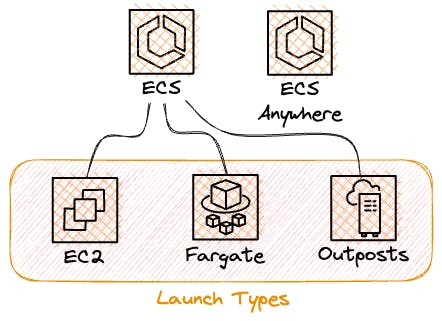
Launch types define the underlying infrastructure where your containers run within ECS. AWS ECS provides three primary launch types, each with its unique use cases, advantages, and considerations.
Choosing the Right Launch Type
Selecting between ECS on EC2, AWS Fargate, and External hinges on your application's demands.
-
ECS on EC2 offers greater control and customization over your infrastructure. Opt for it when you need precise resource management and compatibility with existing EC2 instances.
-
AWS Fargate is the choice if you want to focus solely on your containers without concerning yourself with infrastructure management. It's perfect for modern, serverless, and scalable applications.
-
External is ideal for orchestrating containers running outside the ECS environment. Use it when you need to integrate with external resources or manage hybrid deployments.
Key Components
We will dive deep into the key components that form the backbone of Amazon Elastic Container Service (ECS).
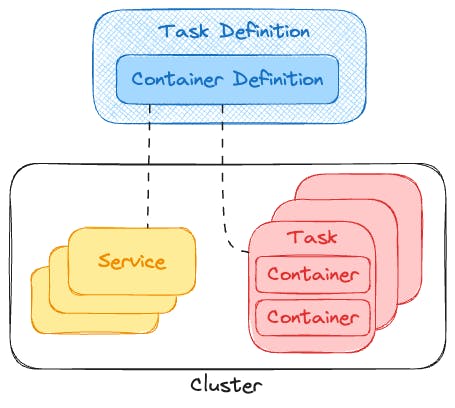
Whether you're just starting your journey with containers or a seasoned AWS explorer, understanding these components is essential for harnessing the full power of ECS.
Frequently Asked Questions
-
What are the main benefits of using ECS with Fargate?
The main benefits of using ECS with Fargate include service maturity, ease of use, cost-efficiency, widespread adoption, and provider independence. -
What is the difference between ECS and Fargate?
ECS is a container orchestration service, while Fargate is a serverless compute engine for containers. Fargate allows you to run containers without managing the underlying infrastructure. -
Can I use ECS with other computing options than Fargate?
Yes, you can use ECS with either EC2 instances or Fargate, depending on your needs and preferences for infrastructure management. -
Why do I need a container orchestration service?
Container orchestration automates the management of containers, making it easier to scale applications up or down and ensuring high availability through features like load balancing, automatic failover, and self-healing. -
What is a task definition in ECS?
A task definition is a blueprint that outlines how to launch one or multiple containers in ECS. It includes details such as the launch type, roles, container image, CPU and memory allocation, environment variables, secrets, logging configuration, and exposed ports.
References
https://blog.awsfundamentals.com/aws-ecs-beginner-guide
https://blog.awsfundamentals.com/ecs-on-fargate
https://blog.awsfundamentals.com/