Trying GPT Models with the OpenAI Playground
To Nha Notes | Nov. 20, 2023, 1:21 p.m.
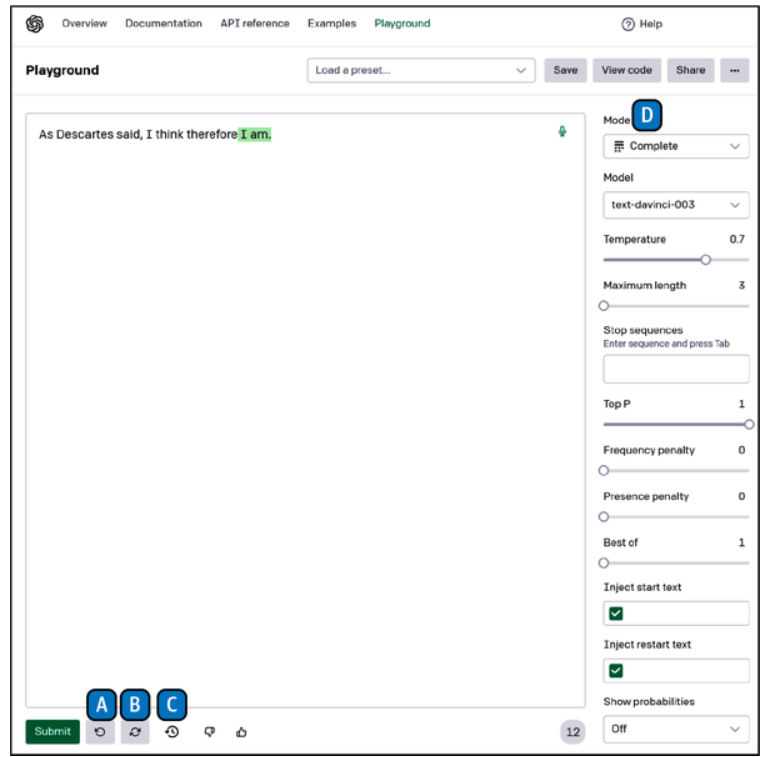
An excellent way to test the different language models provided by OpenAI directly, without coding, is to use the OpenAI Playground, a web-based platform that allows you to quickly test the various LLMs provided by OpenAI on specific tasks. The Playground lets you write prompts, select the model, and easily see the output that is generated.
Here’s how to access the Playground:
-
Navigate to the OpenAI home page and click Developers, then Overview.
-
If you already have an account and are not logged in, click Login at the upper right of the screen. If you don’t have an account with OpenAI, you will need to create one in order to use the Playground and most of the OpenAI features. Click Sign Up at the upper right of the screen. Note that because there is a charge for the Playground and the API, you will need to provide a means of payment.
-
Once you are logged in, you will see the link to join the Playground at the upper left of the web page. Click the link, and you should see something similar to below figure.