Transitioning objects using Amazon S3 Lifecycle
To Nha Notes | Nov. 24, 2022, 10:04 p.m.
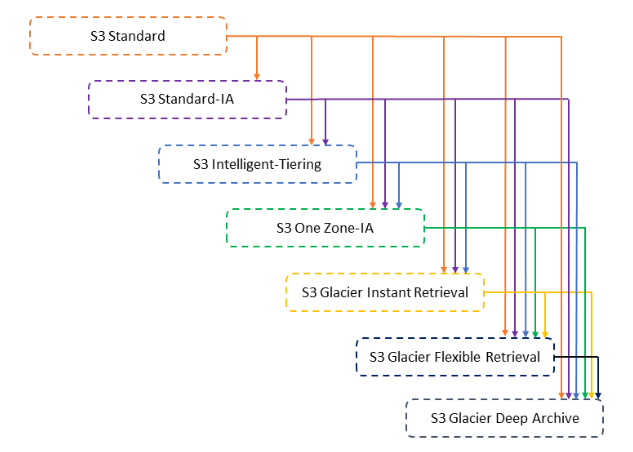
Storage classes
- Amazon S3 Standard (S3 Standard)
- Amazon S3 Intelligent-Tiering (S3 Intelligent-Tiering)
- Amazon S3 Standard-Infrequent Access (S3 Standard-IA)
- Amazon S3 One Zone-Infrequent Access
- Amazon S3 Glacier (S3 Glacier)
- Amazon S3 Glacier Deep Archive (S3 Glacier Deep Archive)
Classes can be associated with use-cases.
| Use Case | Class |
|---|---|
| General Purpose | Amazon S3 Standard (S3 Standard) |
| Unknown or changing access | Amazon S3 Intelligent-Tiering (S3 Intelligent-Tiering) |
| Infrequent access | Amazon S3 Standard-Infrequent Access (S3 Standard-IA) |
| Infrequent access | Amazon S3 One Zone-Infrequent Access |
| Archive | Amazon S3 Glacier (S3 Glacier) |
| Archive | Amazon S3 Glacier Deep Archive (S3 Glacier Deep Archive) |
There are two Archive offerings for S3. Glacier, Glacier Deep Archive. Each comes with their own price and properties.
| Glacier | Glacier Deep Archive | |
|---|---|---|
| Minimum storage duration charge | 90 days | 180 days |
| Data retrieval times | Configurable, from minutes to hours | Within 12 hours |
| Pricing | $0.005 per GB | $0.002 per GB |
Compared against the S3 Standard cost of $0.025 per GB, there is a significant saving when using the Archive storage classes.
Lifecycle policies
You can use lifecycle policies to define actions you want Amazon S3 to take during an object’s lifetime (for example, transition objects to another storage class, archive them, or delete them after a specified period of time).
Here’s Amazon’s example of creating an S3 bucket with an attached lifecycle policy that transitions the class to Glacier after one day, and then deletes the file after one year.
{
  "AWSTemplateFormatVersion": "2010-09-09",
  "Resources": {
    "S3Bucket": {
      "Type": "AWS::S3::Bucket",
      "Properties": {
        "AccessControl": "Private",
        "LifecycleConfiguration": {
          "Rules": [
            {
              "Id": "GlacierRule",
              "Prefix": "glacier",
              "Status": "Enabled",
              "ExpirationInDays": "365",
              "Transitions": [
                {
                  "TransitionInDays": "1",
                  "StorageClass": "GLACIER"
                }
              ]
            }
          ]
        }
      }
    }
  },
  "Outputs": {
    "BucketName": {
      "Value": {
        "Ref": "S3Bucket"
      },
      "Description": "Name of the sample Amazon S3 bucket with a lifecycle configuration."
    }
  }
}
Configuring S3 Lifecycle Rules in AWS CDK
The transition rules we are going to set end up looking like this:
| Day | Action |
|---|---|
| Day 0 | Objects were uploaded to the bucket |
| Day 30 | Objects transition to standard Infrequent Access |
| Day 60 | Objects transition to Intelligent Tiering |
| Day 90 | Objects transition to Glacier |
| Day 180 | Objects transition to Glacier Deep Archive |
| Day 365 | Objects expire and get deleted from S3 and Glacier |
import * as s3 from 'aws-cdk-lib/aws-s3';
import * as cdk from 'aws-cdk-lib';

export class CdkStarterStack extends cdk.Stack {
  constructor(scope: cdk.App, id: string, props?: cdk.StackProps) {
    super(scope, id, props);

    const s3Bucket = new s3.Bucket(this, 's3-bucket', {
      removalPolicy: cdk.RemovalPolicy.DESTROY,
      autoDeleteObjects: true,
      // 👇 set up lifecycle rules
      lifecycleRules: [
        {
          // 👇 optionally apply object name filtering
          // prefix: 'data/',
          abortIncompleteMultipartUploadAfter: cdk.Duration.days(90),
          expiration: cdk.Duration.days(365),
          transitions: [
            {
              storageClass: s3.StorageClass.INFREQUENT_ACCESS,
              transitionAfter: cdk.Duration.days(30),
            },
            {
              storageClass: s3.StorageClass.INTELLIGENT_TIERING,
              transitionAfter: cdk.Duration.days(60),
            },
            {
              storageClass: s3.StorageClass.GLACIER,
              transitionAfter: cdk.Duration.days(90),
            },
            {
              storageClass: s3.StorageClass.DEEP_ARCHIVE,
              transitionAfter: cdk.Duration.days(180),
            },
          ],
        },
      ],
    });
  }
}
Specifying a lifecycle rule for a versioning-enabled bucket
Suppose that you have a versioning-enabled bucket, which means that for each object, you have a current version and zero or more noncurrent versions. (For more information about S3 Versioning, see Using versioning in S3 buckets.) In this example, you want to maintain one year's worth of history, and delete the noncurrent versions. S3 Lifecycle configurations supports keeping 1 to 100 versions of any object.
To save storage costs, you want to move noncurrent versions to S3 Glacier Flexible Retrieval 30 days after they become noncurrent (assuming that these noncurrent objects are cold data for which you don't need real-time access). In addition, you expect frequency of access of the current versions to diminish 90 days after creation, so you might choose to move these objects to the S3 Standard-IA storage class.
<LifecycleConfiguration>
<Rule>
<ID>sample-rule</ID>
<Filter>
<Prefix></Prefix>
</Filter>
<Status>Enabled</Status>
<Transition>
<Days>90</Days>
<StorageClass>STANDARD_IA</StorageClass>
</Transition>
<NoncurrentVersionTransition>
<NoncurrentDays>30</NoncurrentDays>
<StorageClass>S3 Glacier Flexible Retrieval</StorageClass>
</NoncurrentVersionTransition>
<NoncurrentVersionExpiration>
<NewerNoncurrentVersions>5</NewerNoncurrentVersions>
<NoncurrentDays>365</NoncurrentDays>
</NoncurrentVersionExpiration>
</Rule>
</LifecycleConfiguration>
Removing expired object delete markers
A versioning-enabled bucket has one current version and zero or more noncurrent versions for each object. When you delete an object, note the following:
-
If you don't specify a version ID in your delete request, Amazon S3 adds a delete marker instead of deleting the object. The current object version becomes noncurrent, and the delete marker becomes the current version.
-
If you specify a version ID in your delete request, Amazon S3 deletes the object version permanently (a delete marker is not created).
-
A delete marker with zero noncurrent versions is referred to as an expired object delete marker.
This example shows a scenario that can create expired object delete markers in your bucket, and how you can use S3 Lifecycle configuration to direct Amazon S3 to remove the expired object delete markers.
Suppose that you write a S3 Lifecycle policy that uses the NoncurrentVersionExpiration action to remove the noncurrent versions 30 days after they become noncurrent and retains at most 10 noncurrent versions, as shown in the following example.
<LifecycleConfiguration>
<Rule>
...
<NoncurrentVersionExpiration>
<NewerNoncurrentVersions>10</NewerNoncurrentVersions>
<NoncurrentDays>30</NoncurrentDays>
</NoncurrentVersionExpiration>
</Rule>
</LifecycleConfiguration>
The NoncurrentVersionExpiration action does not apply to the current object versions. It removes only the noncurrent versions.
The current object versions follow a well-defined lifecycle.
In this case, you can use an S3 Lifecycle policy with the Expiration action to direct Amazon S3 to remove the current versions, as shown in the following example.
<LifecycleConfiguration>
<Rule>
...
<Expiration>
<Days>60</Days>
</Expiration>
<NoncurrentVersionExpiration>
<NewerNoncurrentVersions>10</NewerNoncurrentVersions>
<NoncurrentDays>30</NoncurrentDays>
</NoncurrentVersionExpiration>
</Rule>
</LifecycleConfiguration>
In this example, Amazon S3 removes current versions 60 days after they are created by adding a delete marker for each of the current object versions. This process makes the current version noncurrent, and the delete marker becomes the current version.
The NoncurrentVersionExpiration action in the same S3 Lifecycle configuration removes noncurrent objects 30 days after they become noncurrent. Thus, in this example, all object versions are permanently removed 90 days after object creation. Although expired object delete markers are created during this process, Amazon S3 detects and removes the expired object delete markers for you.
References
https://garyrafferty.com/aws/S3-Object-Lifecyle/
https://bobbyhadz.com/blog/aws-cdk-s3-lifecycle-rules
https://docs.aws.amazon.com/AmazonS3/latest/userguide/lifecycle-configuration-examples.html
https://docs.aws.amazon.com/cdk/api/v1/docs/@aws-cdk_aws-s3.LifecycleRule.html
https://github.com/aws-samples/rds-snapshot-export-to-s3-pipeline
https://github.com/slouc/aws-rds-export-to-athena
https://github.com/binbashar/terraform-aws-rds-export-to-s3
https://aws.amazon.com/premiumsupport/knowledge-center/rds-mysql-export-snapshot/
https://aws.amazon.com/premiumsupport/knowledge-center/update-key-policy-future/
https://docs.aws.amazon.com/kms/latest/developerguide/key-policy-overview.html
https://docs.aws.amazon.com/cdk/api/v2/python/aws_cdk.aws_kms/README.html