Testing state machines locally with Step Functions Local
To Nha Notes | Oct. 10, 2023, 3:24 p.m.
Step Functions local
AWS Step Functions Local is a downloadable version of Step Functions that lets you develop and test applications using a version of Step Functions running in your own development environment. The local version of Step Functions can invoke AWS Lambda functions, both in AWS and while running locally.
Benefits of using Step Functions local
The new Step Functions local Docker image enables you to get started with Step Functions local quickly by using a docker image with all the dependencies. The new Docker image also enables you to include Step Functions local in your containerized builds and as part of your continuous integration testing.
There are no state transition costs with Step Functions local.
The following topics describe how you can set up Step Functions Local using Docker and JAR file, and run Step Functions Local to work with AWS Lambda, AWS Serverless Application Model(AWS SAM) CLI Local, or other supported services.
Topics
- Setting Up Step Functions Local (Downloadable Version) and Docker
- Setting Up Step Functions Local (Downloadable Version) - Java Version
- Setting Configuration Options for Step Functions Local
- Running Step Functions Local on Your Computer
- Testing Step Functions and AWS SAM CLI Local
- Using Mocked Service Integrations
Sample projects for Step Functions
In the AWS Step Functions console, you can choose one of the following starter templates to deploy state machines to your AWS accounts. These starter templates are ready-to-run sample projects that automatically create the workflow proptotype and definition, and all related AWS resources for the project.
You can use these sample projects to deploy and run them as is, or use the workflow prototypes to build on them. If you build upon these projects, Step Functions creates the workflow prototype, but doesn't deploy the resources listed in the workflow definition.
When you deploy the sample projects, they provision a fully functional state machine, and create the related resources for the state machine to run. When you create a sample project, Step Functions uses AWS CloudFormation to create the related resources referenced by the state machine.
Common State Fields
-
InputPath (Optional) – Holds a JSON path to select a portion of the state’s input for task processing. Default value is $, which means the entire input is used by the task.
-
OutputPath (Optional) – A JSON path to specify a portion of the input that should be passed to the output. Default value is $, so the entire input is passed on to the output of the state.
Pass State
-
Result – Used to specify the output of the Pass state to be passed to the next state. It is often used in conjunction with the ResultPath field.
-
ResultSelector
Use the ResultSelector field to manipulate a state's result before ResultPath is applied. The ResultSelector field lets you create a collection of key value pairs, where the values are static or selected from the state's result. Using the ResultSelector field, you can choose what parts of a state's result you want to pass to the ResultPath field.
-
ResultPath – This is used to merge the input of the state with the values provided in the Result field.
-
Parameters – Create a key-value pair that will be passed as input. We can either use constants, or it can be picked from the input of the state.
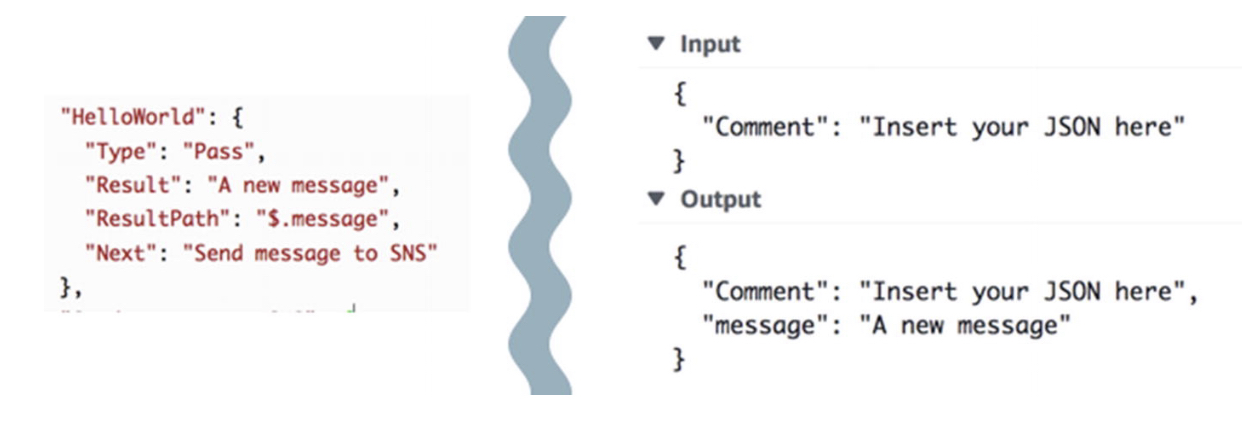
InputPath, ResultPath, and OutputPath Examples
Get a Token from the Context Object
The context object is an internal JSON object that contains information about your execution. Like state input, it can be accessed with a path from the"Parameters" field during an execution. When accessed from within a task definition, it includes information about the specific execution, including the task token.
{ "Execution": { "Id": "arn:aws:states:us-east-1:123456789012:execution:stateMachineName:executionName", "Input": { "key": "value" }, "Name": "executionName", "RoleArn": "arn:aws:iam::123456789012:role...", "StartTime": "2019-03-26T20:14:13.192Z" }, "State": { "EnteredTime": "2019-03-26T20:14:13.192Z", "Name": "Test", "RetryCount": 3 }, "StateMachine": { "Id": "arn:aws:states:us-east-1:123456789012:stateMachine:stateMachineName", "Name": "name" }, "Task": { "Token": "h7XRiCdLtd/83p1E0dMccoxlzFhglsdkzpK9mBVKZsp7d9yrT1W" } }
You can access the task token by using a special path from inside the "Parameters" field of your task definition. To access the input or the context object, you first specify that the parameter will be a path by appending a .$ to the parameter name. The following specifies nodes from both the input and the context object in a "Parameters"specification.
"Parameters": { "Input.$": "$", "TaskToken.$": "$$.Task.Token" },
In both cases, appending .$ to the parameter name tells Step Functions to expect a path. In the first case, "$" is a path that includes the entire input. In the second case, $$. specifies that the path will access the context object, and $$.Task.Tokensets the parameter to the value of the task token in the context object of a running execution.
Topics
- Manage a batch job (AWS Batch, Amazon SNS)
- Manage a container task (Amazon ECS, Amazon SNS)
- Transfer data records (Lambda, DynamoDB, Amazon SQS)
- Poll for Job Status (Lambda, AWS Batch)
- Task Timer (Lambda, Amazon SNS)
- Callback Pattern Example (Amazon SQS, Amazon SNS, Lambda)
- Manage an Amazon EMR Job
- Run an EMR Serverless job
- Start a Workflow within a Workflow (Step Functions, Lambda)
- Dynamically process data with a Map state
- Process a CSV file with Distributed Map
- Process data in an Amazon S3 bucket with Distributed Map
- Train a Machine Learning Model
- Tune a Machine Learning Model
- Process High-Volume Messages from Amazon SQS (Express Workflows)
- Selective Checkpointing Example (Express Workflows)
- Build an AWS CodeBuild Project (CodeBuild, Amazon SNS)
- Preprocess data and train a machine learning model
- Lambda orchestration example
- Start an Athena query
- Execute multiple queries (Amazon Athena, Amazon SNS)
- Query large datasets (Amazon Athena, Amazon S3, AWS Glue, Amazon SNS)
- Keep data up to date (Amazon Athena, Amazon S3, AWS Glue)
- Manage an Amazon EKS cluster
- Make a call to API Gateway
- Call a microservice with API Gateway
- Send a custom event to EventBridge
- Invoke Synchronous Express Workflows
- Run ETL/ELT workflows using Amazon Redshift
- Use Step Functions and AWS Batch with error handling
- Fan out an AWS Batch job
- AWS Batch with Lambda
Tutorials for Step Functions
Topics
- Create a Step Functions state machine that uses Lambda
- Handling Error Conditions Using a State Machine
- Repeat an action using Inline Map state
- Getting started with using Distributed Map state
- Processing entire batch of data with a Lambda function
- Processing individual data items with a Lambda function
- Periodically start a state machine execution using EventBridge
- Starting a State Machine Execution in Response to Amazon S3 Events
- Creating a Step Functions API using API Gateway
- Create a Step Functions state machine using AWS SAM
- Creating an Activity state machine
- Iterating a Loop Using Lambda
- Continuing Ongoing Work as a New Execution
- Deploying an Example Human Approval Project
- View X-Ray traces in Step Functions
- Gather Amazon S3 bucket info using AWS SDK service integrations
Reference
https://docs.aws.amazon.com/step-functions/latest/dg/sfn-local.html
https://hub.docker.com/r/amazon/aws-stepfunctions-local
https://docs.aws.amazon.com/step-functions/latest/dg/create-sample-projects.html
https://docs.aws.amazon.com/step-functions/latest/dg/tutorials.htmlhtml
https://docs.aws.amazon.com/step-functions/latest/dg/concepts-access-cross-acct-resources.html
https://docs.aws.amazon.com/step-functions/latest/dg/connect-supported-services.html