Streaming Amazon DynamoDB data into a centralized data lake
To Nha Notes | June 2, 2025, 8:44 p.m.
Use case 1: DynamoDB and Amazon S3 in same AWS account
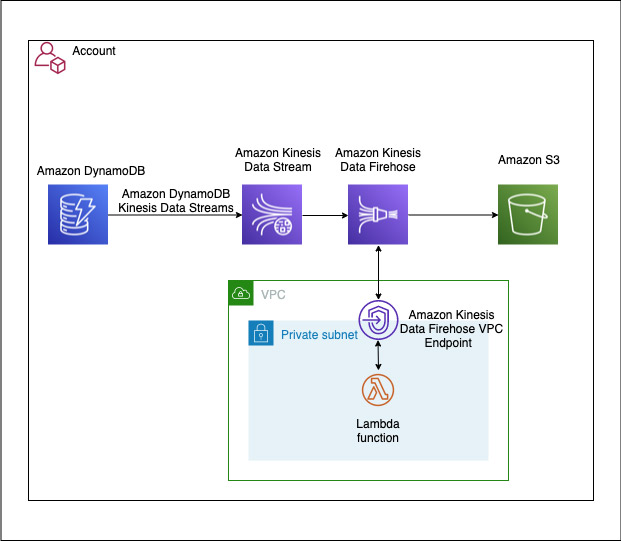
In our first use case, our DynamoDB table and S3 bucket are in the same account. We have the following resources:
- A Kinesis data stream is configured to use 10 shards, but you can change this as needed.
- A DynamoDB table with Kinesis streaming enabled is a source to the Kinesis data stream, which is configured as a source to a Firehose delivery stream.
- The Firehose delivery stream is configured to use a Lambda function for record transformation along with data delivery into an S3 bucket. The Firehose delivery stream is configured to batch records for 2 minutes or 1 MiB, whichever occurs first, before delivering the data to Amazon S3. The batch window is configurable for your use case. For more information, see Configure settings.
- The Lambda function used for this solution transformsthe DynamoDB item’s multi-level JSON structure to a single-level JSON structure. It’s configured to run in a private subnet of an Amazon VPC, with no internet access. You can extend the function to support more complex business transformations.
The following diagram illustrates the architecture of the solution.
DynamoDB with Streams Enabled
DynamoDB is the source of truth for our data. By enabling DynamoDB Streams, we can capture every change made to the data — whether it’s an insert, update, or delete.
AWS Lambda for Real-Time Processing
Lambda functions are triggered by DynamoDB Streams. They process each event in real-time, translating these changes into operations on our S3 data lake.
References
https://aws.amazon.com/blogs/big-data/streaming-amazon-dynamodb-data-into-a-centralized-data-lake/