Snowflake: Query Acceleration Service — The Warehouse Booster
To Nha Notes | March 8, 2023, 2:20 p.m.
The Query Acceleration Service (QAS) is now generally available to all Snowflake Accounts — Enterprise edition and up. It is a feature that allows Snowflake virtual warehouses to have essentially boundless amount of resources as it needs to accelerate parts of queries.
What is Query Acceleration Service?
It’s a common situation where a virtual warehouse takes workloads of varying sizes. Let’s say in a virtual warehouse, most queries finishes in about 10 minutes, some takes 30 minutes, and other much heavier queries takes hours to complete. Usually these heavy queries involves scanning large amounts of data and the warehouse resources are just not enough to handle it. In these situations you can increase the warehouse size, however that would automatically double the warehouse cost. The size increase may not even be a good idea in this case given that most of its workload is only light.
QAS is there so that virtual warehouses can temporarily borrow additional resources when required granting it the flexibility to expand and have as many resources as it needs. The best part is, there is no manual intervention required from the users. It just need to be enabled once and you’re good to go.
Enabling Query Acceleration Service
It’s as simple as setting the warehouse parameter ENABLE_QUERY_ACCELERATION to true.
-- Upon warehouse creation
create warehouse my_warehouse
  ENABLE_QUERY_ACCELERATION = true;

-- Enable on an existing warehouse
alter warehouse my_warehouse
  set ENABLE_QUERY_ACCELERATION = true;
“With great power, comes great cost.” Query acceleration service can increase the cost depending on how much resources is leased by the warehouse. So, how do we control it?
Scale Factor
You can set the maximum scale factor for leasing compute resources by setting a value on QUERY_ACCELERATION_MAX_SCALE_FACTOR warehouse parameter. The value set into this will be the multiplier of the current warehouse size. To explain that further, below are different sizes of a virtual warehouse and their respective amount of servers / processors.
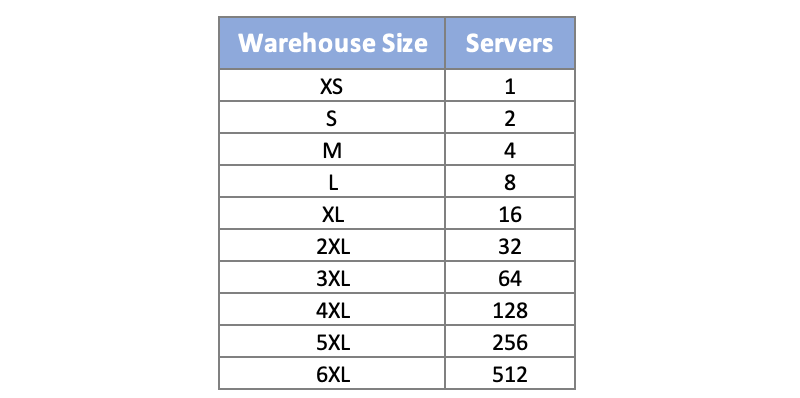
Setting the QUERY_ACCELERATION_MAX_SCALE_FACTOR to 8 on an XL warehouse will grant it 16x8 or 128 servers ready to be used for its processing needs, similar to what a 4XL warehouse have. The difference in this case however is that the warehouse have the flexibility to scale up and down between XL to 4XL depending on what is required by the query.
Setting the Scale Factor
-- Upon warehouse creation
create warehouse my_warehouse
  ENABLE_QUERY_ACCELERATION = true
  QUERY_ACCELERATION_MAX_SCALE_FACTOR = <num>;

-- Modifying an existing QAS enabled warehouse
alter warehouse my_warehouse
  set QUERY_ACCELERATION_MAX_SCALE_FACTOR = <num>;
This parameter accepts a value from 0 to 100. Setting it to 0 eliminates the limit and allows queries to lease as many resources as necessary and as available to service the query. If the QUERY_ACCELERATION_MAX_SCALE_FACTOR parameter is not defined on a QAS-enabled warehouse, it will by default have a scale factor of 8.
It is important to remember that this parameter only sets the upper limit of resources for a warehouse. It will not always be maximized — Snowflake decides and will use only what’s necessary.
Query Acceleration Service Eligibility
Although QAS is enabled on warehouse level, not every query can benefit from it. Currently the following query types are supported:
- SELECT
- INSERT-SELECT
- CREATE TABLE AS SELECT (CTAS)
These types of queries must also involve scanning or processing large amount of data. Remember that QAS is there to help a suffering warehouse. If the warehouse is not choked up by the query, then there’s no reason for it to lease extra resource from QAS.
Check Eligibility
1. SYSTEM$ESTIMATE_QUERY_ACCELERATION
Is a built-in snowflake function that can be used to check if a query is eligible for acceleration.
select parse_json(system$estimate_query_acceleration('<query_id>'));
The above statement will return something like the following if the query is eligible for QAS. Note that status = eligible. It also shows some estimations of how much time the query will take when QAS is enabled with the given scale factors.
{
  "estimatedQueryTimes": {
    "1": 171,
    "10": 115,
    "2": 152,
    "4": 133,
    "8": 120
  },
  "originalQueryTime": 300.291,
  "queryUUID": "8cd54bf0-1651-5b1c-ac9c-6a9582ebd20f",
  "status": "eligible",
  "upperLimitScaleFactor": 10
}
If the query is not eligible for QAS, the function will return something like the following:
{
  "estimatedQueryTimes": {},
  "originalQueryTime": 20.291,
  "queryUUID": "cf23522b-3b91-cf14-9fe0-988a292a4bfa",
  "status": "ineligible",
  "upperLimitScaleFactor": 0
}
2. QUERY_ACCELERATION_ELIGIBLE View
Is an ACCOUNT_USAGE object that can be queried to find all queries that are eligible for acceleration.
/*
   Identify the queries that will benefit the most from QAS based on
   the amount of query execution time that is eligible for acceleration:
*/
SELECT query_id, eligible_query_acceleration_time
FROM SNOWFLAKE.ACCOUNT_USAGE.QUERY_ACCELERATION_ELIGIBLE
ORDER BY eligible_query_acceleration_time DESC;
Since QAS is enabled on warehouse level, it might be a good starting point to see which warehouses have the most acceleration opportunity. The following query can give you just that.
SELECT warehouse_name
      , SUM(eligible_query_acceleration_time) AS total_eligible_time
FROM SNOWFLAKE.ACCOUNT_USAGE.QUERY_ACCELERATION_ELIGIBLE
GROUP BY warehouse_name
ORDER BY total_eligible_time DESC;
Usage Monitoring
Snowflake provides helpful information in order to track both usage and cost of using QAS. Below is where you can find them.
- The QUERY_HISTORY View now have the following columns. This allows us to find queries that benefited from QAS along with the complete details about the query behaviour.
- QUERY_ACCELERATION_BYTES_SCANNED
- QUERY_ACCELERATION_PARTITIONS_SCANNED
- QUERY_ACCELERATION_UPPER_LIMIT_SCALE_FACTOR
2. QUERY_ACCELERATION_HISTORY View
This QAS-specific object has been introduced. It holds warehouse-level acceleration cost details.
-- QAS cost for each warehouse (month-to-date):
select warehouse_name,
       sum(credits_used) as total_credits_used
from query_acceleration_history
where start_time >= date_trunc(month, current_date)
group by 1
order by 2 desc;
This is definitely great to have since QAS is also a serverless feature of Snowflake. This means that there is a system maintained warehouse dedicated for QAS and is shared across the Account.
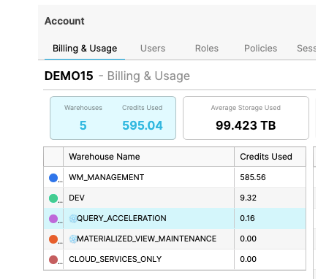
Because of this nature of serverless features, segregating the cost of using them is a challenge. With the QUERY_ACCELERATION_HISTORY View providing warehouse-level credit consumption, we can easily and accurately keep track of additional cost per warehouse for using QAS.
Final Thoughts
Overall, this is an incredible feature. It’s very easy to implement, maintain and keep track of. It’s most useful on warehouses with workloads of unpredictable data volume. It can help ad hoc analytics queries involving massive table scans. It can ease up the traffic on warehouses that are often too busy and unable to accommodate more workload.
What I would like to see in the future is for us to have the option to manually trigger a warehouse boost like this rather than completely relying on Snowflake to make that decision for us, allowing us to accelerate specific queries only rather than the entire warehouse. And if I can be more ambitious, it would be even better if we can boost queries mid-run in case it didn’t get enough resources to finish on time.
That’s all for now and if you enjoy contents like this, follow me or subscribe to my newsletter. Cheers!
References
https://medium.com/snowflake/snowflake-query-acceleration-service-the-warehouse-booster-f24bc41b15b
https://docs.snowflake.com/en/user-guide/query-acceleration-service