Snowflake JOINs
To Nha Notes | Oct. 24, 2022, 2:28 p.m.
There are different types of Snowflake JOINs supported by Snowflake; they are:
- Inner Join
- Outer Join
- Left Outer Join
- Right Outer Join
- Full Outer Join
- Cross Join
- Natural Join
- Lateral Join
Outer Snowflake Join
Outer join include left, right, and full outer join. These return rows that do not satisfy the join predicate, unlike inner join.
a) Left Outer Snowflake Join
Left Outer Snowflake Join returns all records from the left table (Table A) regardless of whether they match the join condition or not. It also returns any matching records from the right table (Table B).
The syntax is:
SELECT columns
FROM Table_A A
LEFT OUTER JOIN Table_B B
ON A.join_column = B.join_column;
For example:
Now, let's see the left outer Snowflake join in action.
-- Left Outer Snowflake Joins
SELECT S.StudentName, G.Course, G.Grade
FROM Students S
LEFT OUTER JOIN Grades G
ON S.StudentID = G.StudentID;
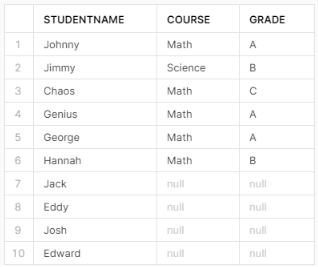
Executing left outer Snowflake join query in Snowflake
As you can see in this example, a Left Outer Join is being performed between the Students and Grades tables on the StudentID column. The SELECT statement is targeting the StudentName column from the Students table and the Course and Grade columns from the Grades table. The result will include all records from the Students table, and wherever there's a matching StudentID in the Grades table, the corresponding Course and Grade will be displayed. In cases where there isn't a match, NULL values will appear for the Course and Grade columns.
b) Right Outer Snowflake Join
Right Outer Snowflake Join is the inverse of a left outer join. It returns all records from the right table (Table B) regardless of whether they satisfy the join condition or not. It also returns any matching records from the left table (Table A).
The syntax is:
SELECT columns
FROM Table_A A
RIGHT OUTER JOIN Table_B B
ON A.join_column = B.join_column;
For example:
Now, let's see the right outer Snowflake join in action.
-- Right Outer Snowflake Joins
SELECT S.StudentName, G.Course, G.Grade
FROM Students S
RIGHT OUTER JOIN Grades G
ON S.StudentID = G.StudentID;
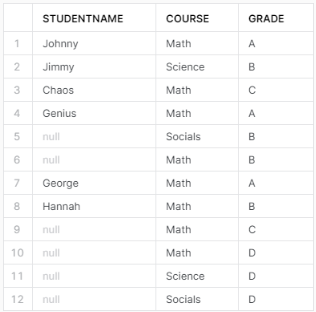
Executing right outer Snowflake join query in Snowflake
As you can see, this query will return all records from the Grades table, and the matched records from the Students table. If there is no match, NULL values will be displayed for the StudentName column from the Students table.
c) Full Outer Snowflake Join
Full Outer Snowflake Joins combines the effects of left and right outer joins. It returns all records from both tables, matching or not. Where no match exists, NULL values are placed.
The syntax is:
SELECT columns
FROM Table_A A
FULL OUTER JOIN Table_B B
ON A.join_column = B.join_column;
For example:
Now, let's see the full outer Snowflake join in action.
-- Full Outer Snowflake Joins
SELECT S.StudentName, G.Course, G.Grade
FROM Students S
FULL OUTER JOIN Grades G
ON S.StudentID = G.StudentID;
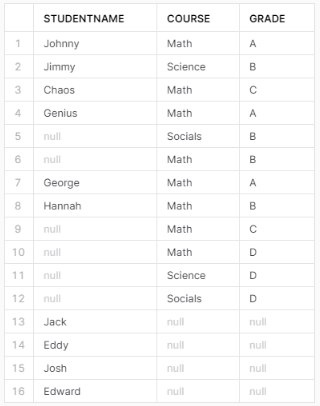
Executing full outer Snowflake join query in Snowflake
As you can see, this query will return all records from both the Students and Grades tables. When there's a matching StudentID in both tables, the corresponding StudentName, Course, and Grade will be displayed together. If there's no match, NULL values will be displayed for the missing columns.
References
https://docs.snowflake.com/en/sql-reference/constructs/join.html