Snowflake data sharing, separating Production from Development
To Nha Notes | Oct. 27, 2022, 3:47 p.m.
We can separate production from development by using an entirely separate database and account instance, or we can separate it using different databases within the same Snowflake account. We can copy production data into the development environment, or we can include fake data that looks and feels like the actual data. We can also structure environments so that read privileges in production are mimicked in development.
The smallest amount of separation we can have between development and production is by utilizing sandbox schemas for development. From there, we can move to using a different database within the same Snowflake account, which is more separation, but would not be considered fully separate. Then, to fully achieve prod/dev separation, we can use separate accounts.
Data Sharing Solution Brief
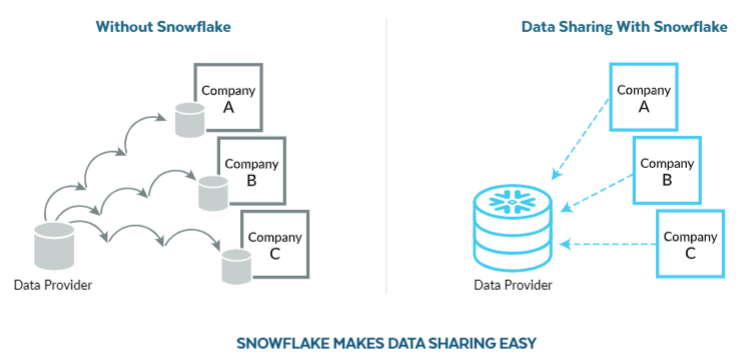
With Snowflake, you can easily share data, create insights, and build a network around your data. Data security, data protection, data warehouse management, and more are all built in. Whether data sharing is one-to-one, one-to-many, or many-to-many, there is no data movement with Snowflake.
At a basic level, data sharing is the ability to distribute the same sets of data resources with multiple users or applications while maintaining data fidelity across all entities consuming the data. With Secure Data Sharing, no actual data is copied or transferred between accounts.
This is an important concept because it means that shared data does not take up any storage in a consumer account and, therefore, does not contribute to the consumer’s monthly data storage charges. The only charges to consumers are for the compute resources (i.e. virtual warehouses) used to query the shared data.
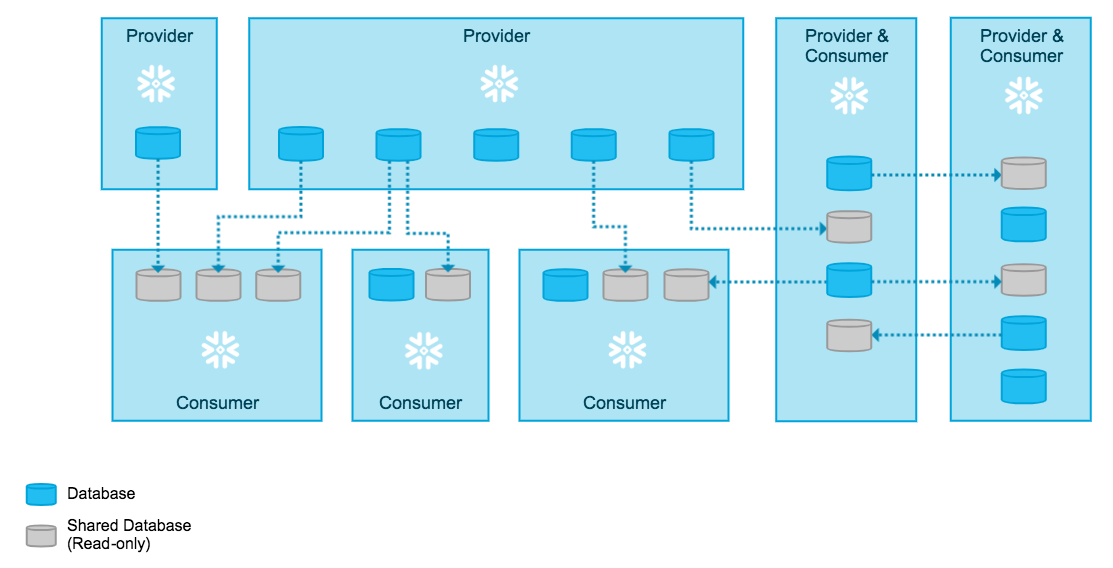
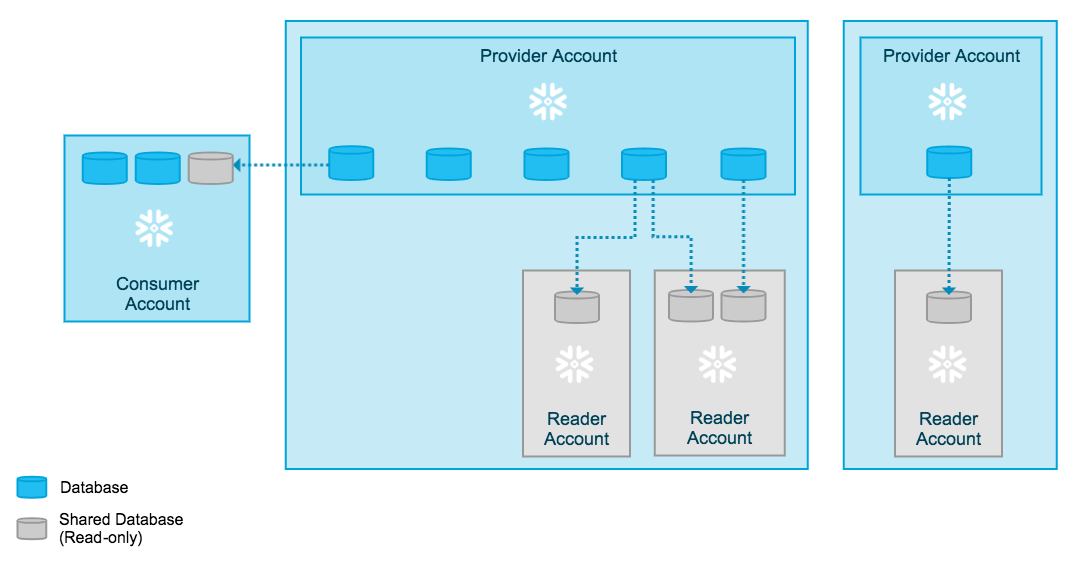
The provider creates a share of a database in their account and grants access to specific objects in the database. The provider can also share data from multiple databases, as long as these databases belong to the same account. One or more accounts are then added to the share, which can include your own accounts (if you have multiple Snowflake accounts).
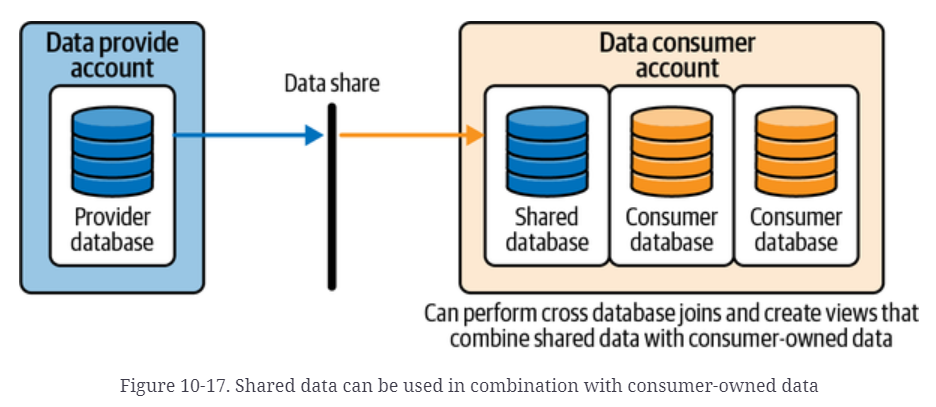
On the consumer side, a read-only database is created from the share. Access to this database is configurable using the same, standard role-based access control that Snowflake provides for all objects in the system.
Using Separate Schemas
Using schemas to separate production and development is not considered prod/dev separation; however, it can work as a starting point, especially for organizations with small teams that may not have a need for full prod/dev separation.
Using Separate Databases
Using databases to separate development from production allows us to essentially create a separate namespace for development. Again, this is not a fully separate environment; however, it seems to be a great compromise between a fully separate account and separate schemas. Snowflake allows cross-database joins, so it is important to note that this is not fully separate, and like with separate schemas, it is important that we choose a naming convention that makes it clear that the data in that database is not to be used for any reporting or dashboarding.
Using Separate Accounts
The simplest way is to engage in account-to-account data sharing, whereby you can share data directly with another account and have your data appear in their Snowflake account without having to move or copy it. The other account could belong to a different internal business unit, for example, or to a different organization altogether.
Snowflake’s Direct Secure Data Sharing Approach
When you are creating outbound shares your account is the Snowflake provider account, whereas the account to which you are sharing your data is the Snowflake consumer account. It’s important to know that a share can contain only a single database.
To include multiple databases in a share, you can create a secure view which can be shared. This is possible provided the objects referenced in the share reside in the same Snowflake account.
- Prep Work
USE ROLE ACCOUNTADMIN;
USE WAREHOUSE COMPUTE_WH;
CREATE OR REPLACE DATABASE DEMO10_DB;
USE SCHEMA DEMO10_DB.PUBLIC;
CREATE OR REPLACE TABLE SHARINGDATA (i integer);
- Creating Outbound Shares
USE ROLE ACCOUNTADMIN;
CREATE OR REPLACE SHARE DEMO10_SHARE2;
GRANT USAGE ON DATABASE DEMO10_DB TO SHARE DEMO10_SHARE2;
GRANT USAGE ON SCHEMA DEMO10_DB.PUBLIC TO SHARE DEMO10_SHARE2;
GRANT SELECT ON TABLE DEMO10_DB.PUBLIC.SHARINGDATA TO SHARE DEMO10_SHARE2;
One of the things you’ll notice is that you are assigning access privileges to the shares that will be used by the data consumers.
The data provider is responsible for bearing the cost of data storage. The consumer is not billed for any data storage costs because the data share, and objects accessed via the share, are not copied or moved to the consumer’s account.
A Snowflake provider can share an outbound share with a virtually unlimited number of accounts, and there is never a cost for the act of sharing data across accounts within the same cloud provider region. The Snowflake data provider can also set terms, through a contract, to limit the resharing of data.
If you are ready to give consumers access to the DEMO10_SHARE, you can add Consumers from Web UI or below command:
ALTER SHARE <name_of_share> ADD ACCOUNTS = <name_of_consumer_account>;
It is important to remember that provider accounts pay for the data storage costs of the shared data and consumer accounts pay for the virtual warehouse cost of compute for querying the data. This assumes that both the data provider and data consumer each has their own Snowflake account.
A situation could arise in which a data provider would like to share data with a consumer who does not currently have a Snowflake account. In that case, the provider can establish and manage a Snowflake reader account. When a provider establishes a reader account for the consumer, the reader account will offer read-only capability for the consumer.
It is not possible to edit shared data. Shared databases are read-only; thus, the data cannot be updated and no new objects within the database can be created by the data consumer. There are some additional limitations for this newly created database. One unique property of the shared database is that the comments cannot be edited.
The data consumer is unable to clone a shared database or the objects within it. However, it is possible to copy the shared data into a new table. While it is technically possible to make a copy of the shared database, it might be a violation of the terms of the contract if both parties entered into such an agreement.
Both reader accounts and full accounts are types of consumer accounts used in Snowflake data sharing. Reader accounts pay none of the compute costs for querying the data. Those costs are paid by the provider account that created the reader account.
Full consumer accounts also have the ability to join their data with the shared data directly in Snowflake, while a reader account can only view the data shared with them in Snowflake.
-
The ACCOUNT_USAGE share, with multiple views, includes records for dropped objects.
-
The ACCOUNT_USAGE share also a longer retention time than the INFORMATION_SCHEMA.
-
The ACCOUNT_USAGE share has an average latency of about two hours, whereas there is no latency when querying the INFORMATION_SCHEMA.
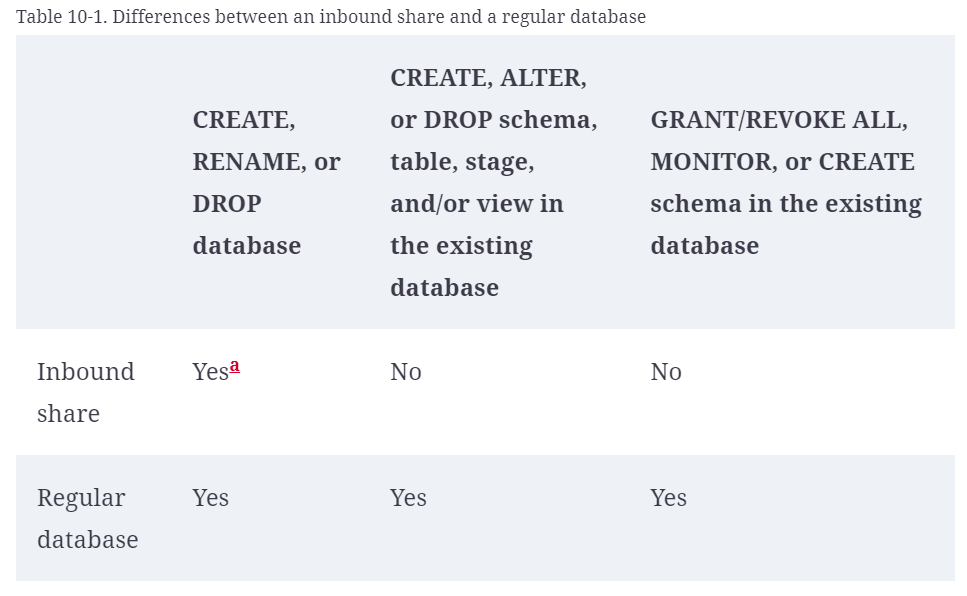
As we’ve seen, share privileges are imported and shared data is read-only. Inbound shares allow you to create and drop a database for the inbound share, but not to change the structure of the database.
When new records are created within the provider’s Snowflake account as part of the shared database, the records are almost instantly available in a data consumer’s inbound shared database. However, when the provider creates new objects within the shared database, those objects are not automatically shared with the data consumer. The provider has to grant authorization to the data share before the records in those objects are viewable by the consumer.
Reader Accounts
This account, as the name suggests, can only read data, but otherwise is a fully functional account (users, roles, authentication, etc.). As a managed account, they are not signing a contract with Snowflake, and you, as the provider, are responsible for all billing.
Data sharing is only supported between Snowflake accounts. As a data provider, you might wish to share data with a consumer who does not already have a Snowflake account and/or is not ready to become a licensed Snowflake customer.
To facilitate sharing data with these consumers, Snowflake supports providers creating reader accounts. Reader accounts (formerly known as “read-only accounts”) provide a quick, easy, and cost-effective way to share data without requiring the consumer to become a Snowflake customer.
Each reader account belongs to the provider account that created it. Similar to standard consumer accounts, the provider account uses shares to share databases with reader accounts; however, a reader account can only consume data from the provider account that created it:
Users in a reader account can query data that has been shared with it, but cannot perform any of the DML tasks that are allowed in a full account (data loading, insert, update, etc.).
Share Design Considerations
As records get added to a provider’s object that is shared with a consumer, they are immediately available to the consumer. However, if an object such as a new table gets added to the database, the new table is not automatically shared with the consumer. The producer must take action to share that new object.
From a technical perspective, different shares can use the same schema, but then it will appear as if all the objects are part of a share even when they aren’t. This makes it particularly difficult to add new objects to existing shares that are part of the same schema.
Difference Between Database Sharing and Database Cloning
Oftentimes, people ask what the difference is between cloning a database and using the Snowflake Secure Data Sharing feature. The answer is that database cloning effectively takes a snapshot of the database, and while the original database continues to change, the cloned database does not. It is important to note that instead of actually making a physical copy of the data, the metadata is used to display a view of the original database as it existed at that point in time. The original database and the cloned database both exist within the same account. In contrast, data sharing occurs across different accounts, and the shared data is a live view of the data which changes whenever changes are made in the original database.
Referenced
https://docs.snowflake.com/en/user-guide/data-sharing-intro.html
The book: Snowflake: The Definitive Guide