Processing input and output in Step Functions workflows
To Nha Notes | Jan. 10, 2025, 11:52 a.m.
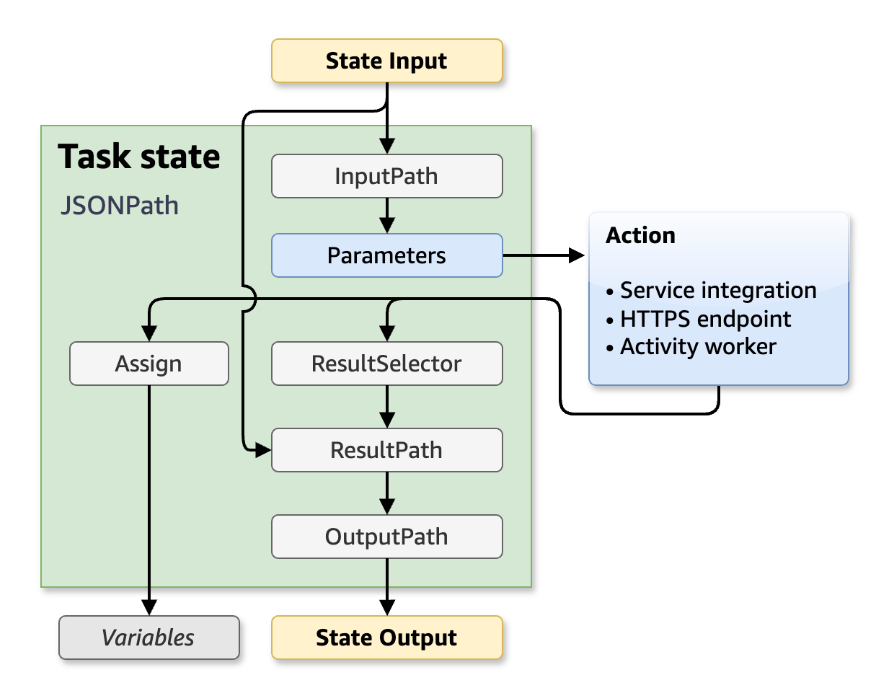
Use ResultPath to replace input with the task result
If you do not specify a ResultPath, the default behavior is the same as "ResultPath": "$". The state will replace the entire state input with the result from the task.
# State Input
{
"comment": "This is a test",
"details": "Default example",
"who" : "Step Functions"
}
# Path
"ResultPath": "$"
# Task result
"Hello, Step Functions!"
# State Output
"Hello, Step Functions!"
Note
ResultPath is used to include content from the result with the input, before passing it to the output. But, if ResultPath isn't specified, the default action is to replace the entire input.
Discard the result and keep the original input
If you set ResultPath to null, the state will pass the original input to the output. The state's input payload will be copied directly to the output, with no regard for the task result.
# State Input
{
"comment": "This is a test",
"details": "Default example",
"who" : "Step Functions"
}
# Path
"ResultPath": null
# Task result
"Hello, Step Functions!"
# State Output
{
"comment": "This is a test",
"details": "Default example",
"who" : "Step Functions"
}
Use ResultPath to include the result with the input
If you specify a path for ResultPath, the state output will combine the state input and task result:
# State Input
{
"comment": "This is a test",
"details": "Default example",
"who" : "Step Functions"
}
# Path
"ResultPath": "$.taskresult"
# Task result
"Hello, Step Functions!"
# State Output
{
"comment": "This is a test",
"details": "Default example",
"who" : "Step Functions",
"taskresult" : "Hello, Step Functions!"
}
You can also insert the result into a child node of the input. Set the ResultPath to the following.
"ResultPath": "$.strings.lambdaresult"
Given the following input:
{
"comment": "An input comment.",
"strings": {
"string1": "foo",
"string2": "bar",
"string3": "baz"
},
"who": "AWS Step Functions"
}
The task result would be inserted as a child of the strings node in the input.
{
"comment": "An input comment.",
"strings": {
"string1": "foo",
"string2": "bar",
"string3": "baz",
"lambdaresult": "Hello, Step Functions!"
},
"who": "AWS Step Functions"
}
The state output now includes the original input JSON with the result as a child node.
Use ResultPath to update a node in the input with the result
If you specify an existing node for ResultPath, the task result will replace that existing node:
# State Input
{
"comment": "This is a test",
"details": "Default example",
"who" : "Step Functions"
}
# Path
"ResultPath": "$.comment"
# Task result
"Hello, Step Functions!"
# State Output
{
"comment": "Hello, Step Functions!",
"details": "Default example",
"who" : "Step Functions"
}
Use ResultPath to include both error and input in a Catch
In some cases, you might want to preserve the original input with the error. Use ResultPath in a Catch to include the error with the original input, instead of replacing it.
"Catch": [{
"ErrorEquals": ["States.ALL"],
"Next": "NextTask",
"ResultPath": "$.error"
}]
If the previous Catch statement catches an error, it includes the result in an error node within the state input. For example, with the following input:
{"foo": "bar"}
The state output when catching an error is the following.
{
"foo": "bar",
"error": {
"Error": "Error here"
}
}
References
https://docs.aws.amazon.com/step-functions/latest/dg/input-output-resultpath.html
https://docs.aws.amazon.com/step-functions/latest/dg/input-output-example.html