Near‑Real‑Time Database Replication to Apache Iceberg on S3 Using Amazon Data Firehose
To Nha Notes | June 10, 2025, 3:31 p.m.
Maintaining fresh, analytics-ready data lakes—without managing your own ETL infrastructure
In November 2024, AWS introduced a game-changing feature in Amazon Data Firehose: near-real-time Change Data Capture (CDC) from databases like PostgreSQL and MySQL, enabling direct streaming into Apache Iceberg tables on Amazon S3 community.aws+5community.aws+5community.aws+5.
🧭 The Challenge
Traditionally, replicating database changes into S3-based data lakes required building custom ETL pipelines:
-
Polling databases periodically, which can create spikes in load.
-
Introducing latency—often hours—before data becomes analytics-ready (community.aws).
🔧 The Modern Solution: Data Firehose CDC to Iceberg

AWS now offers a managed, serverless pipeline that:
-
Captures CDC directly from DB binary logs.
-
Minimizes transactional load.
-
Streams changes straight into Apache Iceberg tables on S3 (community.aws).
Benefits:
-
Simplicity: Fully managed—no servers or custom code needed.
-
Scalability: Built on the same streaming backbone as other Firehose destinations.
-
Fresh Data: Near-real-time updates empower analytics and ML workloads.
🛠️ Step‑by‑Step Setup (Using RDS MySQL)
-
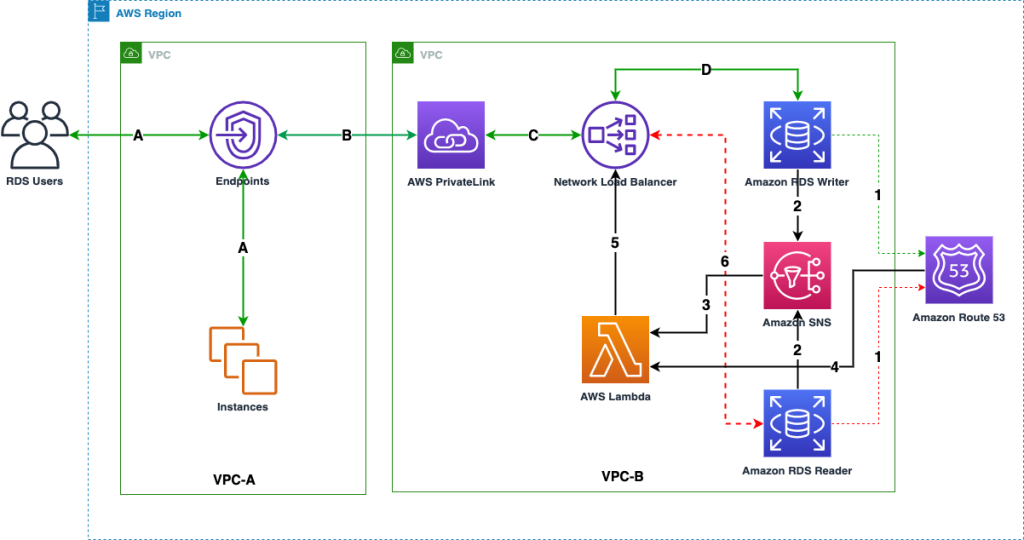
Secure Connectivity via PrivateLink
-
RDS behind a Network Load Balancer (NLB) in your VPC.
-
Firehose accesses RDS through a VPC endpoint.
-
All traffic remains internal, controllable via endpoint policies (community.aws, community.aws).
-
-
Database Preparation
-
Create a custom Parameter Group: set binlog_format=ROW.
-
Apply and reboot RDS.
-
Ensure binary log retention ≥30 hours:
call mysql.rds_set_configuration('binlog retention hours', 30);
``` :contentReference[oaicite:23]{index=23}
-
-
Network Load Balancer & Target Group
-
Create a target group (IP-based, port 3306) pointing to your RDS endpoint.
-
Tie it to an internal NLB for secure access (community.aws).
-
-
VPC Endpoint Service
-
Create an AWS PrivateLink endpoint service attached to the NLB.
-
Authorize firehose.amazonaws.com.
-
Disable "Acceptance required" so Firehose can connect automatically (community.aws).
-
-
Configure the Firehose Stream
-
Source: MySQL (specify RDS endpoint and interface endpoint DNS).
-
Specify tables/databases with regex or explicit naming.
-
Define a watermark table (e.g., school.watermark) for snapshot-tracking.
-
Destination: Apache Iceberg on S3.
-
Enable automatic table creation and schema evolution.
-
Set S3 backup/warehouse bucket (community.aws).
-
-
-
IAM Role & Logging
-
Assign a role trusted by firehose.amazonaws.com, ideally with least privilege.
-
Monitor through CloudWatch logs/error metrics .
-
-
Launch & Monitor
-
Firehose connects, ingests snapshots, and begins streaming CDC events.
-
Use the Firehose console to track:
-
Metrics like records read, errors.
-
Stream health and snapshot status (community.aws).
-
-
-
Query the Data
-
Iceberg tables appear in AWS Glue Data Catalog.
-
Preview data via Athena.
-
Insert new records into MySQL—see them emerge in Athena in near-real-time (community.aws).
-
🧩 Troubleshooting
-
No data ingestion?
-
Check monitoring: if zero records read and no errors, try recreating the stream (community.aws).
-
-
Destination error logs show connection issues?
-
Confirm endpoint connectivity and correct NLB/VPC setup.
-
On MySQL: run FLUSH HOSTS (or mysqladmin flush-hosts) to clear host blocks (community.aws).
-
-
Athena query errors?
-
Ensure your workgroup has a configured S3 query-results bucket (community.aws).
-
Incorrect DNS Resolution for VPC Endpoint:
- While you configured the VPC Endpoint, ensure that DNS resolution for your RDS endpoint is correctly routing through the PrivateLink.
- If "Private DNS enabled" was not checked when creating the VPC Endpoint, or if there are conflicting DNS settings in your VPC, Firehose might be trying to resolve the RDS endpoint over the public internet, bypassing the PrivateLink.
- Check: From an EC2 instance in the Firehose VPC, try to nslookup your RDS endpoint. It should resolve to the private IPs of the VPC Endpoint ENIs, not the public RDS IP (if it has one).
- In summary, the steps to fix this are:
- Go to the VPC Endpoint Service (vpce-svc-0cd00799a20823ea9) in the account where your RDS DB and NLB are.
- Add your RDS DB's DNS name (e.g., my-rds-instance.abcdefg.ap-northeast-1.rds.amazonaws.com) as a private DNS name to the VPC Endpoint Service.
- Wait for the verification process on the Endpoint Service to complete.
- Once verified, go back to your VPC Endpoint and enable "Enable private DNS names".
✅ Conclusion
This new Firehose CDC capability delivers:
-
Simple, serverless streaming from databases to Iceberg tables.
-
Low-latency, scalable replication.
-
Minimal maintenance, freeing your team from infrastructure overhead.
By following secure networking via PrivateLink and configuring Firehose to manage schema evolution and table creation, you unlock near real-time analytics—perfect for dashboards, ML, and more.
🚀 Next Steps
-
Extend to other databases like PostgreSQL or even self-managed instances.
-
Implement transformations or enrichments via native Iceberg/Glue/Athena tools.
-
Integrate downstream with AWS analytics services or ML pipelines for deeper insights.
This implementation shows how to keep your data lake fresh—without the traditional ETL headache. If you're already streaming logs or events today, stepping up to full CDC with Iceberg could be your next big leap.
References:
https://docs.aws.amazon.com/firehose/latest/dev/controlling-access.html#using-iam-iceberg
https://github.com/aws-samples/transactional-datalake-using-amazon-datafirehose-iceberg
https://github.com/aws-samples/aws-glue-streaming-etl-with-apache-iceberg