Migrating from AWS WAF Classic to WAF v2: A Comprehensive Guide
To Nha Notes | June 12, 2025, 2:22 p.m.
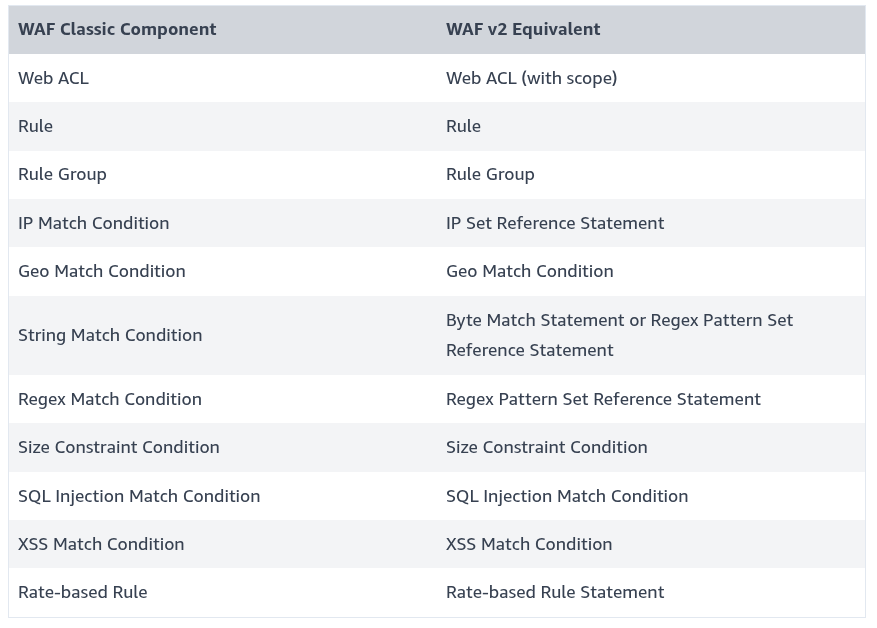
Use this mapping table to understand how WAF Classic components translate to WAF v2:
Migrating a web ACL from AWS WAF Classic to AWS WAF
I want to migrate my current AWS WAF Classic deployment to AWS WAF. I also want to know the downtime involved in the migration.
Resolution
Note: Before you start your migration, see Migration caveats and limitations.
Use one of the following options to migrate from AWS WAF Classic to AWS WAF.
Manual migration
Use manual migration for simple AWS WAF deployments. A manual migration recreates AWS WAF Classic resources in AWS WAF. The migration might cause inconsistencies in request handling until it's complete.
To perform a manual migration, complete the following:
- Set up AWS WAF.
- Complete the steps in Migrating a web ACL: switchover.
- Review your new web access control list (web ACL) and update its configuration as needed.
Security Automations for AWS WAF (automated)
Use Security Automations for AWS WAF to automatically migrate to AWS WAF. This solution uses AWS CloudFormation. Then, associate the new web ACL with a supported resource, such as:
- Amazon CloudFront distribution
- Amazon API Gateway REST API
- Application Load Balancer
- AWS AppSync GraphQL API
- Amazon Cognito user pool
- AWS App Runner service
- AWS Verified Access instance
There's no downtime involved in this migration process. It's a best practice to test and tune your AWS WAF protections before you implement the rules in production.
Note: When you use Security Automations for AWS WAF to migrate from AWS WAF Classic, you must not use the AWS WAF Classic migration wizard. For additional information, see Migration caveats and limitations.
To use Security Automations for AWS WAF to deploy a new web ACL, complete the following steps:
- Open Security Automations for AWS WAF.
- Under Deployment options, choose Launch in the AWS Console.
- For Region, choose the AWS Region where you want to create your AWS WAF resources.
- For Create stack, use the default settings and then choose Next.
- Enter a Stack name and choose the Parameters for your use case. For information on Parameters, see Step 1. Launch the stack.
Note: You must choose an Endpoint Type that matches the resource that's currently in AWS WAF Classic. If you use API Gateway REST API or Application Load Balancer, then choose ALB. - Choose Next.
- (Optional) Configure stack options or use the default settings. Then, choose Next.
- Review your configuration. Then, acknowledge that CloudFormation will create AWS Identity and Access Management (IAM) resources in your account.
- Choose Create Stack.
CloudFormation creates a new stack with all the resources required for the Security Automation, including a new AWS WAF web ACL.
Note: The new web ACL isn't automatically associated with any AWS resources.
To complete the migration to AWS WAF, you must manually associate the AWS WAF web ACL with your AWS resources. This process automatically disassociates the AWS resource from the AWS WAF Classic web ACL. After you associate the resource with the new AWS WAF web ACL, the web ACL's rules inspect incoming requests.
After you migrate to AWS WAF, it's a best practice to review your new web ACL and update its configuration as needed.
Note: You might need to manually recreate existing rules that can't be automatically migrated. For more information, see Migrating a web ACL: manual follow-up.
AWS WAF Classic migration wizard (automated)
Use the AWS WAF Classic migration wizard to automatically migrate existing AWS WAF Classic resources to AWS WAF. There are cases where you must not use the AWS WAF Classic migration wizard. For more information, see Migration caveats and limitations.
There's no downtime involved in this migration process. It's a best practice to test and tune your AWS WAF protections before you implement the rules in production.
To use the AWS WAF Classic migration wizard to deploy a new web ACL, complete the following steps:
- Open the AWS WAF console.
- In the navigation pane, choose Switch to AWS WAF Classic.
- In the navigation pane, choose Web ACLs, and then choose Migration Wizard.
- For Web ACL, choose the Region where you want to create your AWS WAF resources. Then, choose the AWS WAF Classic web ACL that you want to migrate.
- For Migration configuration, choose Create new. This creates a new S3 bucket that CloudFormation uses during the migration.
Note: The S3 bucket must be in the same Region as the web ACL and its name must start with the prefix aws-waf-migration-.
It's a best practice to use Auto apply the bucket policy required for migration to avoid permission issues. - For Choose how to handle rules that can't be migrated, choose the option that best suits your requirements.
Note: It's a best practice to use Exclude rules that can't be migrated to continue the migration. However, you must manually create rules that can't be automatically migrated. - Choose Next.
- Choose Start creating CloudFormation template.
- Choose Create CloudFormation Stack.
- For Create stack, use the default settings and then choose Next.
- Enter a Stack name and then choose the Parameters for your use case. For information on Parameters, see Step 1. Launch the stack.
Note: You must choose an Endpoint Type that matches the resource that's currently in AWS WAF Classic. If you use API Gateway REST API or Application Load Balancer, then choose ALB. - Choose Next.
- (Optional) Configure stack options or use the default settings. Then, choose Next.
- Review your configuration, then choose Create Stack.
CloudFormation creates a new stack with all the resources that are migrated from AWS WAF Classic, including a new AWS WAF web ACL.
Note: The new web ACL isn't automatically associated with any AWS resources.
To complete the migration to AWS WAF, you must manually associate the AWS WAF web ACL with your AWS resources. This process automatically disassociates the AWS resource from the AWS WAF Classic web ACL. After you associate the resource with the new AWS WAF web ACL, the web ACL's rules inspect incoming requests.
After you migrate to AWS WAF, it's a best practice to review your new web ACL and update its configuration as needed.
Note: You might need to manually recreate existing rules that can't be automatically migrated. For more information, see Migrating a web ACL: manual follow-up.
References
- https://repost.aws/knowledge-center/migrate-waf-classic-to-aws-waf
- https://docs.aws.amazon.com/solutions/latest/security-automations-for-aws-waf/solution-overview.html
- https://docs.aws.amazon.com/solutions/latest/security-automations-for-aws-waf/aws-cloudformation-templates.html
- https://docs.aws.amazon.com/waf/latest/developerguide/waf-migrating-caveats.html
- Migrating from AWS WAF Classic to WAF v2: A Comprehensive Guide. (n.d.). AWS Community. Retrieved from https://community.aws/content/2x3PNsnr6IvctFZkEWzs00YXHOY/migrating-from-aws-waf-classic-to-waf-v2-a-comprehensive-guide?lang=en