Migrating Airflow to Dagster
To Nha Notes | July 18, 2024, 2:18 p.m.
Enter dagster-airflow - the easy way to move from the old to the new
dagster-airflow is a new package that provides interoperability between Dagster and Airflow. The main scenario for using the dagster-airflow adapter is to do a lift-and-shift migration of all your existing Airflow DAGs into Dagster.
For some use cases, you may also want to orchestrate Dagster job runs from Airflow. While a less common use case, we will touch on it at the end of this article.
Option 1: Lift and Shift from Airflow to Dagster
Most organizations who migrate off Airflow to Dagster will first do a limited POC, quickly test things out and build confidence that Dagster is the superior solution. Once the team is ready to make the switch, they lift-and-shift their pipelines over to Dagster. This process typically takes a few days to a couple of weeks.
While ultimately, lift-and-shift is the most common pattern, organizations can make this transition on their own timelines, and we provide plenty of options for incremental adoption.
As this is the most popular migration pattern, we will cover this one first.
From DAGs to Jobs
In Dagster, ops are organized into jobs. A single op is a relatively simple and reusable computation step, whereas a job is a logical sequence of ops that achieve a specific goal, such as updating a table.
Jobs are the main unit of execution and monitoring in Dagster.
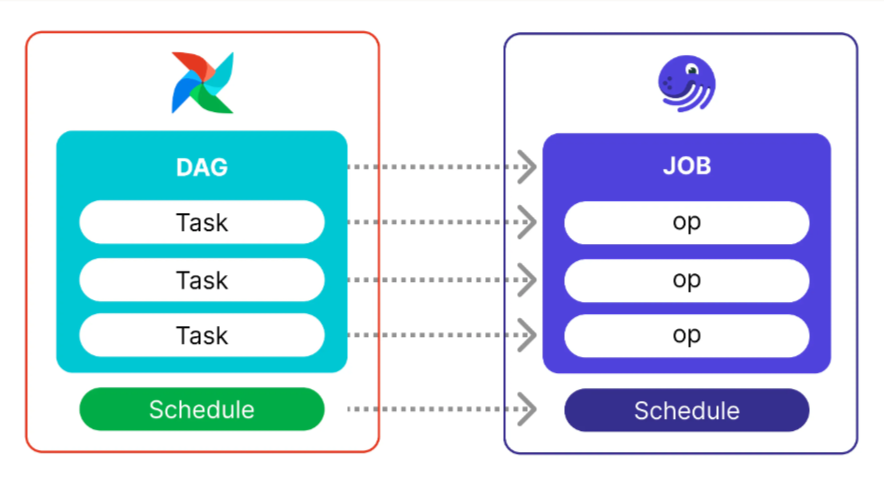
From Airflow DAGs to Dagster Software-defined Assets
In Dagster, Software-defined Assets are abstractions that power the declarative nature of the framework. With SDAs, developers can shift their focus from the execution of tasks to the assets produced - the end product of the data engineering effort.
Software-defined Assets provide much greater observability, advanced scheduling, and - combined with Dagster’s I/O Managers - make it much easier to switch your work between environments, such as testing in development, then switching pipelines to production.
Switching from an Airflow DAG to a pipeline built around Software-Defined Assets is a more advanced maneuver than transitioning to Jobs, but don’t let that intimidate you. The new dagster-airflow library makes this transition much smoother, and you can get to value much faster than by manually refactoring your code.
The first step in porting Airflow DAGs to Dagster Software-defined Assets is to import them using the dagster-airflow library, as described in the Dagster Docs. Once imported the Airflow DAG becomes a single (and possibly quite large) partitioned Dagster asset known as a graph-backed asset.
Option 2: Trigger Dagster jobs from Airflow
While not a typical pattern, some teams may wish to work with Dagster but sit in an organization with an established Airflow implementation. In this scenario, you may want to build jobs and manage data assets in Dagster but manage the execution of those from Airflow.
You can orchestrate Dagster job runs from Airflow by using the DagsterCloudOperator or DagsterOperator operators in your existing Airflow DAGs, and a quick guide is provided in the migration guide.
This pattern will allow you to perform most of your development work within the modern development environment of Dagster and only need to touch Airflow when scheduling the execution of your new Jobs or Assets.
Translating Airflow pipelines to Dagster
Now, let’s walk through the full tutorial_taskflow_api.py example DAG, and how it would be translated to Dagster assets.
import json
import pendulum
from airflow.decorators import dag, task
@dag(
schedule=None,
start_date=pendulum.datetime(2021, 1, 1, tz="UTC"),
catchup=False,
tags=["example"],
)
def tutorial_taskflow_api():
"""
### TaskFlow API Tutorial Documentation
This is a simple data pipeline example which demonstrates the use of
the TaskFlow API using three simple tasks for Extract, Transform, and Load.
Documentation that goes along with the Airflow TaskFlow API tutorial is
located
[here](https://airflow.apache.org/docs/apache-airflow/stable/tutorial_taskflow_api.html)
"""
@task
def extract():
"""
#### Extract task
A simple Extract task to get data ready for the rest of the data
pipeline. In this case, getting data is simulated by reading from a
hardcoded JSON string.
"""
data_string = '{"1001": 301.27, "1002": 433.21, "1003": 502.22}'
order_data_dict = json.loads(data_string)
return order_data_dict
@task(multiple_outputs=True)
def transform(order_data_dict: dict):
"""
#### Transform task
A simple Transform task which takes in the collection of order data and
computes the total order value.
"""
total_order_value = 0
for value in order_data_dict.values():
total_order_value += value
return {"total_order_value": total_order_value}
@task
def load(total_order_value: float):
"""
#### Load task
A simple Load task which takes in the result of the Transform task and
instead of saving it to end user review, just prints it out.
"""
print(f"Total order value is: {total_order_value:.2f}")
order_data = extract()
order_summary = transform(order_data)
load(order_summary["total_order_value"])
tutorial_taskflow_api()
By converting the Airflow task to a Dagster @asset, and our Airflow dag to a Dagster @job, the resulting code will look like the following.
import json
from dagster import AssetExecutionContext, Definitions, define_asset_job, asset
@asset
def extract():
"""Extract task
A simple Extract task to get data ready for the rest of the data pipeline. In this case, getting
data is simulated by reading from a hardcoded JSON string.
"""
data_string = '{"1001": 301.27, "1002": 433.21, "1003": 502.22}'
order_data_dict = json.loads(data_string)
return order_data_dict
@asset
def transform(extract):
"""Transform task
A simple Transform task which takes in the collection of order data and computes the total order
value.
"""
total_order_value = 0
for value in extract.values():
total_order_value += value
return total_order_value
@asset
def load(context: AssetExecutionContext, transform):
"""Load task
A simple Load task which takes in the result of the Transform task and instead of saving it to
end user review, just prints it out.
"""
context.log.info(f"Total order value is: {transform:.2f}")
airflow_taskflow_example = define_asset_job(
name="airflow_taskflow_example",
selection=[extract, transform, load]
)
defs = Definitions(
assets=[extract, transform, load],
jobs=[airflow_taskflow_example]
)
Deployment to AWS
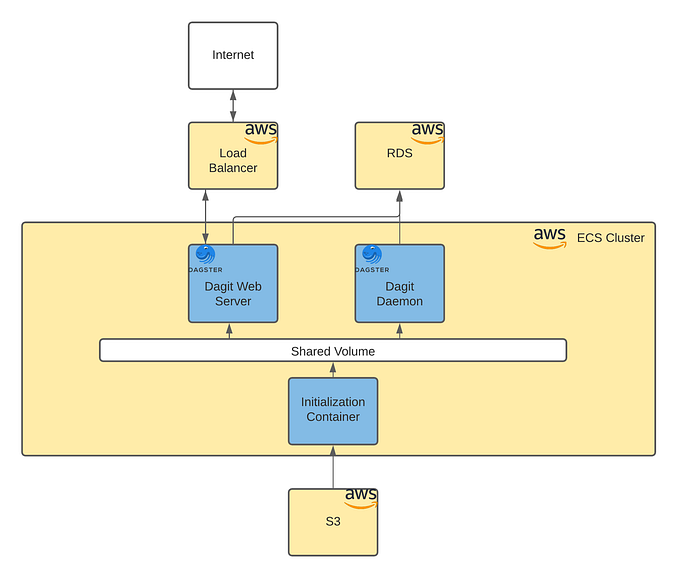
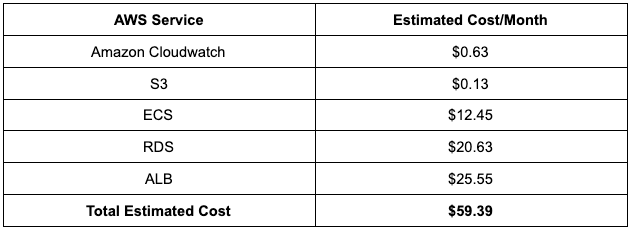
The average cost of this Dagster environment in AWS (minimal setup) is illustrated below:
Summary:
To wrap up, migrating off Airflow and onto Dagster will boost your team’s ability to rapidly develop, deploy and maintain high-quality pipelines so that they can deliver more effectively against your stakeholder's expectations.
You can join the many data teams that were looking for an Airflow alternative, and are now working on Dagster.Join us and rediscover how fun working with data can be!
Here is a summary of key resources for organizations looking to migrate off Airflow and onto Dagster:
- The migration guide.
- The dagster-airflow library.
- Looking for an example of an Airflow to Dagster migration? Check out the dagster-airflow migration example repo on GitHub.
- Join our growing community on Slack, and get answers straight from the Dagster Labs engineering team or other Dagster experts from the community.
- Finally, check out the Feb. 2023 Airflow → Dagster migration event, where we provide more inspiration, tips, and insights for a smooth migration.
References
https://docs.dagster.io/guides/migrations/migrating-airflow-to-dagster
https://dagster.io/blog/dagster-airflow-migration
https://www.restack.io/docs/airflow-vs-dagster
https://medium.com/dataroots/deploying-dagster-to-aws-ee85bfe5f2bd
https://docs.dagster.io/deployment/guides/aws
https://github.com/datarootsio/terraform-aws-ecs-dagster
https://docs.dagster.io/deployment/guides/docker