How to use AWS DMS to migrate Data & capture CDC from source RDS to S3
To Nha Notes | Feb. 16, 2022, 11:52 a.m.
For Amazon RDS as a source, we recommend ensuring that backups are enabled to set up CDC. We also recommend ensuring that the source database is configured to retain change logs for a sufficient time—24 hours is usually enough.
There are two types of ongoing replication tasks:
-
Full load plus CDC – The task migrates existing data and then updates the target database based on changes to the source database.
-
CDC only – The task migrates ongoing changes after you have data on your target database.
Performing replication starting from a CDC start point
You can start an AWS DMS ongoing replication task (change data capture only) from several points. These include the following:
-
From a custom CDC start time – You can use the AWS Management Console or AWS CLI to provide AWS DMS with a timestamp where you want the replication to start. AWS DMS then starts an ongoing replication task from this custom CDC start time. AWS DMS converts the given timestamp (in UTC) to a native start point, such as an LSN for SQL Server or an SCN for Oracle. AWS DMS uses engine-specific methods to determine where to start the migration task based on the source engine's change stream.
-
From a CDC native start point – You can also start from a native point in the source engine's transaction log. In some cases, you might prefer this approach because a timestamp can indicate multiple native points in the transaction log. AWS DMS supports this feature for the following source endpoints:
-
SQL Server
-
PostgreSQL
-
Oracle
-
MySQL
-
When the task is created, AWS DMS marks the CDC start point, and it can't be changed. To use a different CDC start point, create a new task.
Determining a CDC native start point
A CDC native start point is a point in the database engine's log that defines a time where you can begin CDC. As an example, suppose that a bulk data dump has already been applied to the target. You can look up the native start point for the ongoing replication-only task. To avoid any data inconsistencies, carefully choose the start point for the replication-only task. DMS captures transactions that started after the chosen CDC start point.
Following are examples of how you can find the CDC native start point from supported source engines:
To get the current log sequence number (LSN) in a MySQL database, run the following command.
mysql> show master status;
The query returns a binlog file name, the position, and several other values. The CDC native start point is a combination of the binlogs file name and the position, for example mysql-bin-changelog.000024:373. In this example, mysql-bin-changelog.000024 is the binlogs file name and 373 is the position where AWS DMS needs to start capturing changes. Read more here https://docs.aws.amazon.com/dms/latest/userguide/CHAP_Task.CDC.html
Sample CSV data which synced to S3 via DMS --- s3://<BUCKET_NAME>/<RAW_DATA_FOLDER>/<RDS_MYSQL_DB>/<TABLE_NAME>/20220216-101842600.csv --- U,4323c1da1a574acda5278bd0837297f6,eccube,datasource1,2022-02-08 07:57:42.000000,2022-02-08 07:57:42.000000 U,4323c1da1a574acda5278bd0837297f6,eccube,datasource2,2022-02-08 07:57:42.000000,2022-02-08 07:57:42.000000 Execute below these Snowflake SQLs to copy data from S3 Snowflake. CREATE OR REPLACE FILE FORMAT <DB>.<SCHEMA>.CDC_CSV_FORMAT TYPE = CSV FIELD_DELIMITER = ',' SKIP_HEADER = 1; CREATE OR REPLACE STAGE <SNOWFLAKE_DB>.<SNOWFLAKE_SCHEMA>.CDC_TEST STORAGE_INTEGRATION = S3_INTEGRATION URL = 's3://<BUCKET_NAME>/<RAW_DATA_FOLDER>/<RDS_MYSQL_DB>/<TABLE_NAME>/' FILE_FORMAT = <SNOWFLAKE_DB>.<SNOWFLAKE_SCHEMA>.CDC_CSV_FORMAT; CREATE OR REPLACE TABLE <SNOWFLAKE_DB>.<SNOWFLAKE_SCHEMA>.CDC_TEST ( "EVENT_TYPE" STRING NOT NULL , "ID" STRING NOT NULL , "NAME" STRING NOT NULL , "TYPE" STRING NOT NULL , "CREATED_AT" TIMESTAMP_TZ NOT NULL , "UPDATED_AT" TIMESTAMP_TZ NOT NULL ); COPY INTO <SNOWFLAKE_DB>.<SNOWFLAKE_SCHEMA>.CDC_TEST FROM @<SNOWFLAKE_DB>.<SNOWFLAKE_SCHEMA>.CDC_TEST;
Indicating source DB operations in migrated S3 data
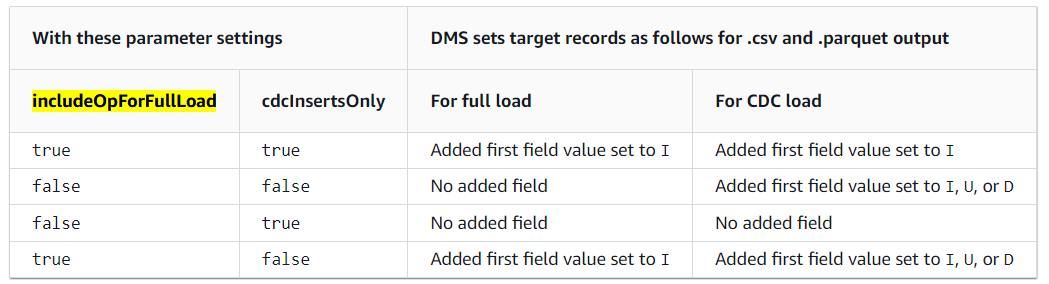
All files created during the ongoing replication, have the first column marked with I, U, or D. These symbols represent the DML operation on the source and stand for Insert, Update, or Delete operations.
For full load files, you can add this column by configuring the endpoint setting.
includeOpForFullLoad=true
This ensures that all full load files are marked with an I operation.
Reference MyQL server settings from previous post
https://nekochan.vn/blog/technical/cdc-pipeline-mysql-snowflake/
References:
https://docs.aws.amazon.com/dms/latest/userguide/CHAP_Target.S3.html#CHAP_Target.S3.DatePartitioning
https://docs.aws.amazon.com/dms/latest/APIReference/API_S3Settings.html
https://docs.aws.amazon.com/dms/latest/sbs/chap-rdssqlserver2s3datalake.steps.targetendpoint.html
https://docs.aws.amazon.com/dms/latest/userguide/CHAP_Task.CDC.html