How to Skip Table Suspension for MySQL Partition DDL Changes in AWS DMS
To Nha Notes | March 12, 2025, 7:48 p.m.
AWS DMS doesn't support DDL changes for partitioned tables for MySQL. For AWS DMS versions 3.4.6 and higher, setting this to true skips table suspension for partition DDL changes during CDC. AWS DMS ignores partitioned-table-related DDL, and continues to process further binary log changes.
Default value: false
Use extra connection attributes to define additional endpoint settings for AWS DMS as follows:
-
Select the MySQL source endpoint to modify.
-
In the Endpoint settings section, check the Use endpoint connection attributes checkbox.
-
Add the following setting:
skipTableSuspensionForPartitionDdl=true
-
Refer to the following screenshot for more details.
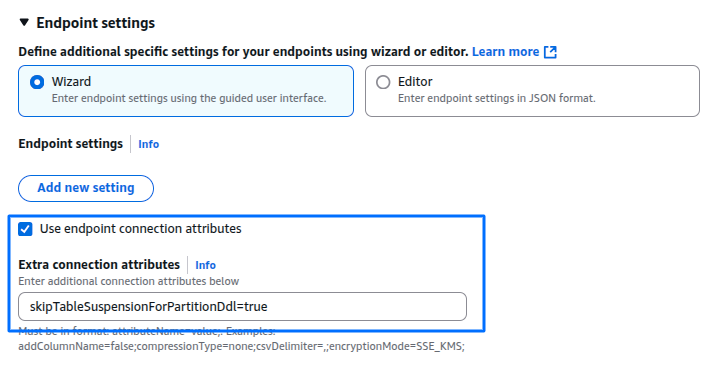
- Or adding this settings like the following line of code via CDK
extraConnectionAttributes: 'skipTableSuspensionForPartitionDdl=true',
Below are sample log entries from DMS task logs indicating issues with partition-related DDL operations (ADD/DROP/TRUNCATE)
2025-03-12T07:35:46 [SOURCE_CAPTURE ]W: Cannot change partition in table 'rebot_enduser'. Altering partitions is not currently supported (mysql_endpoint_capture.c:2122)
2025-03-12T07:35:46 [SOURCE_CAPTURE ]W: Suspending table 'rebot_enduser', table id '6' (mysql_endpoint_capture.c:1918)
2025-03-12T07:35:46 [TASK_MANAGER ]W: Table 'ebdb'.'rebot_enduser' was errored/suspended (subtask 0 thread 0). (replicationtask.c:3081)