Deploy Airflow on AWS ECS using AWS Copilot
To Nha Notes | July 29, 2024, 11:50 a.m.
Airflow Architecture
Airflow consist of several components:
-
Workers - Execute the assigned tasks
-
Scheduler - Responsible for adding the necessary tasks to the queue
-
Web server - HTTP Server provides access to DAG/task status information
-
Database - Contains information about the status of tasks, DAGs, Variables, connections, etc.
-
Celery - Queue mechanism
Please note that the queue at Celery consists of two components:
-
Broker - Stores commands for execution
-
Result backend - Stores status of completed commands
https://airflow.apache.org/docs/apache-airflow-providers-celery/stable/celery_executor.html
The components communicate with each other in many places
-
[1] Web server –> Workers - Fetches task execution logs
-
[2] Web server –> DAG files - Reveal the DAG structure
-
[3] Web server –> Database - Fetch the status of the tasks
-
[4] Workers –> DAG files - Reveal the DAG structure and execute the tasks
-
[5] Workers –> Database - Gets and stores information about connection configuration, variables and XCOM.
-
[6] Workers –> Celery’s result backend - Saves the status of tasks
-
[7] Workers –> Celery’s broker - Stores commands for execution
-
[8] Scheduler –> DAG files - Reveal the DAG structure and execute the tasks
-
[9] Scheduler –> Database - Store a DAG run and related tasks
-
[10] Scheduler –> Celery’s result backend - Gets information about the status of completed tasks
-
[11] Scheduler –> Celery’s broker - Put the commands to be executed
Note
The DAGS folder in Airflow 2 should not be shared with the webserver. While you can do it, unlike in Airflow 1.10, Airflow has no expectations that the DAGS folder is present in the webserver. In fact it’s a bit of security risk to share the dags folder with the webserver, because it means that people who write DAGS can write code that the webserver will be able to execute (ideally the webserver should never run code which can be modified by users who write DAGs). Therefore if you need to share some code with the webserver, it is highly recommended that you share it via config or plugins folder or via installed Airflow packages (see below). Those folders are usually managed and accessible by different users (Admins/DevOps) than DAG folders (those are usually data-scientists), so they are considered as safe because they are part of configuration of the Airflow installation and controlled by the people managing the installation.
Benefits of running Airflow using AWS Fargate
With AWS Fargate, you can run Airflow core components and its jobs entirely without creating and managing servers. You don’t have to guess the server capacity you need to run your Airflow cluster, worry about bin packing, or tweak autoscaling groups to maximize resource utilization. You only pay for resources that your Airflow jobs need. Here are some benefits of running Airflow using Fargate:
- No more patching, securing, or managing servers — Fargate ensures that the infrastructure your containers run on is always up-to-date with the required patches, which reduces your team’s operational burden significantly. To upgrade your Airflow cluster, you’ll update the Fargate task with the Airflow container image and restart.
- Managed autoscaling — Fargate allows you to match the compute resources requirements of your Airflow jobs; it helps you add capacity automatically when your cluster is busier without paying for any idle capacity. Each Airflow job runs in a separate Fargate task, so the number of concurrent workflows you can run is only limited by the Fargate quotas in your account. Fargate can also help autoscale Airflow core components, like the web server and scheduler, using Service Auto Scaling.
- Logging and monitoring come included — Fargate has built-in observability tooling, so you don’t have to create your own logging and monitoring infrastructure. You can use the awslogs log driver to send logs to CloudWatch Logs or use Firelens for custom log routing. Logs produced by your Airflow jobs can be collected and consolidated using Fargate’s out-of-the-box logging capabilities.
- Isolation by design — Each Fargate task runs in its own VM-isolated environment, which means concurrent tasks don’t compete for compute resources. You also don’t need to separate sensitive workloads; in Fargate, tasks don’t share Linux kernel with other tasks.
- Spot integration — Airflow jobs can be perfect candidates for Fargate Spot if they can tolerate interruptions, which can help you save up to 70% off the Fargate price.
That’s not all! You also benefit from Fargate’s integrations with other AWS services like AWS Systems Manager and AWS Secrets Manager for storing credentials and configuration securely, and Amazon EFS for persistent storage for tasks that need more than 20GB disk space.
Airflow on Fargate architecture
The infrastructure components in Airflow can be classified into two categories: components that are needed to operate Airflow itself and components that are used to run tasks. The components that belong to the first category are:
- Web server: provides Airflow’s web UI.
- Scheduler: schedules DAGs (Directed Acyclic Graph)
- Database or meta-store: stores Airflow’s metadata
- Executor: the mechanism by which task instances get run
The Airflow documentation describes a DAG (or a Directed Acyclic Graph) as “a collection of all the tasks you want to run, organized in a way that reflects their relationships and dependencies. A DAG is defined in a Python script, which represents the DAGs structure (tasks and their dependencies) as code.”
Using Airflow you can create a pipeline for data processing that may include multiple steps and have inter-dependencies. A DAG represents a sequential process. In other words, there are no loops (hence the name acyclic). For example, a pipeline with steps N1, N2… Nz can go from step N1 to N2 to N3, skip N4, proceed to N5, but it cannot return on N1.
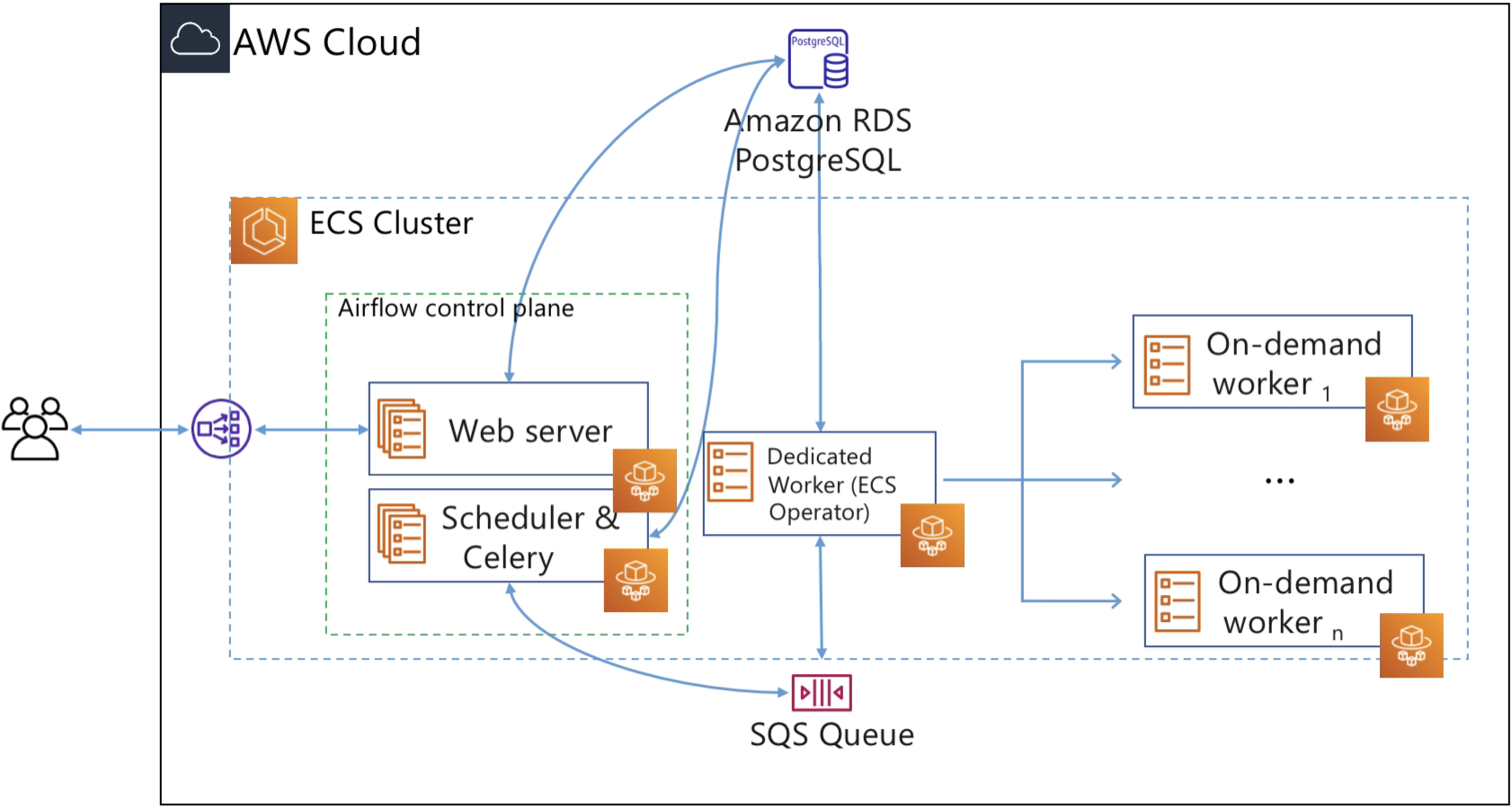
In this post, we run the Airflow control plane components (web server and scheduler) as Fargate services. We use an RDS PostgreSQL database for Airflow metadata storage. To keep the architecture as serverless as possible, we opt for Celery Executor and Amazon SQS as the broker for Celery. In Airflow, the executor runs alongside the scheduler. As the name suggests, the scheduler schedules task by passing task execution details to the executor. The executor then queues tasks using a queuing service like Amazon SQS.
Workers are the resources that run the code you define in your DAG. In Airflow, tasks are created by instantiating an operator class. An operator is used to execute the operation that the task needs to perform. So you define a task in DAG, and the task is then executed using an operator. Since we want to execute tasks as Fargate tasks, we can use the ECS operator, which allows you to run Airflow tasks on capacity provided by either Fargate or Amazon EC2. In this post, we will use the ECS operator to execute tasks on Fargate.

For each task that users submit, the ECS operator creates a new Fargate task (using the ECS run-task API), and this Fargate task becomes the worker that executes the Airflow task.
Airflow Celery Workers

Building the image
https://airflow.apache.org/docs/docker-stack/build.html
https://github.com/apache/airflow/blob/2.8.1/Dockerfile
Dockerfile_postgres
# Dockerfile for PostgreSQL
FROM postgres:14
# Set environment variables
ENV POSTGRES_USER=airflow
ENV POSTGRES_PASSWORD=airflow
ENV POSTGRES_DB=airflow
# Expose port 5432 (default PostgreSQL port)
EXPOSE 5432
Dockerfile_redis
FROM redis:6-alpine
EXPOSE 6379
ENTRYPOINT ["redis-server"]
Dockerfile_webserver
FROM apache/airflow:slim-2.8.1-python3.11
COPY --chown=airflow:root configs/airflow.cfg ${AIRFLOW_HOME}/airflow.cfg
COPY --chown=airflow:root scripts/entrypoint.sh /entrypoint.sh
COPY --chown=airflow:root dags ${AIRFLOW_HOME}/dags
COPY --chown=airflow:root plugins ${AIRFLOW_HOME}/plugins
COPY requirements/requirements.txt /requirements.txt
RUN pip install --no-cache-dir "apache-airflow==${AIRFLOW_VERSION}" -r /requirements.txt
WORKDIR $AIRFLOW_HOME
EXPOSE 8080
ENTRYPOINT ["/usr/bin/dumb-init", "--", "/entrypoint.sh", "webserver"]
CMD []
Dockerfile_scheduler
FROM apache/airflow:slim-2.8.1-python3.11
COPY --chown=airflow:root configs/airflow.cfg ${AIRFLOW_HOME}/airflow.cfg
COPY --chown=airflow:root dags ${AIRFLOW_HOME}/dags
COPY --chown=airflow:root plugins ${AIRFLOW_HOME}/plugins
COPY requirements/requirements.txt /requirements.txt
RUN pip install --no-cache-dir "apache-airflow==${AIRFLOW_VERSION}" -r /requirements.txt
WORKDIR $AIRFLOW_HOME
EXPOSE 8793
ENTRYPOINT ["/usr/bin/dumb-init", "--", "/entrypoint"]
CMD ["airflow", "scheduler"]
Dockerfile_worker
FROM apache/airflow:slim-2.8.1-python3.11
COPY --chown=airflow:root configs/airflow.cfg ${AIRFLOW_HOME}/airflow.cfg
COPY --chown=airflow:root dags ${AIRFLOW_HOME}/dags
COPY --chown=airflow:root plugins ${AIRFLOW_HOME}/plugins
COPY requirements/requirements.txt /requirements.txt
RUN pip install --no-cache-dir "apache-airflow==${AIRFLOW_VERSION}" -r /requirements.txt
WORKDIR $AIRFLOW_HOME
EXPOSE 5555
ENTRYPOINT ["/usr/bin/dumb-init", "--", "/entrypoint"]
CMD ["airflow", "celery", "worker"]
Setting Configuration Options
https://airflow.apache.org/docs/apache-airflow/2.8.1/howto/set-config.html
Entrypoint
https://airflow.apache.org/docs/docker-stack/entrypoint.html
https://github.com/apache/airflow/blob/2.8.1/scripts/docker/entrypoint_prod.sh
https://github.com/puckel/docker-airflow/blob/master/script/entrypoint.sh
https://github.com/nicor88/aws-ecs-airflow/blob/master/config/entrypoint.sh
Deployment
App & Environment
export AWS_PROFILE = <AWS_PROFILE>
copilot app init --name airflow-app
copilot app deploy --name airflow-app
copilot env init --name airflow-env
copilot env deploy --name airflow-env
Postgres
copilot svc init --name postgres
copilot svc deploy --name postgres
Redis
copilot svc init --name redis
copilot svc deploy --name redis
Webserver
copilot svc init --name webserver
--- copilot/webserver/manifest.yml
http:
healthcheck: '/health'
cpu: 512 # Number of CPU units for the task.
memory: 1024 # Amount of memory in MiB used by the task.
count: 1 # Number of tasks that should be running in your service.
exec: true # Enable running commands in your container.
network:
connect: true # Enable Service Connect for intra-environment traffic between services.
storage:
ephemeral: 50
# Optional fields for more advanced use-cases.
#
variables: # Pass environment variables as key value pairs.
LOG_LEVEL: debug
REDIS_HOST: redis
REDIS_PORT: 6379
POSTGRES_HOST: postgres
POSTGRES_PORT: 5432
POSTGRES_USER: airflow
POSTGRES_PASSWORD: airflow
POSTGRES_DB: airflow
FERNET_KEY: 46BKJoQYlPPOexq0OhDZnIlNepKFf87WFwLbfzqDDho=
SECRET_KEY: 46BKJoQYlPPOexq0OhDZnIlNepKFf87WFwLbfzqDDho=
AIRFLOW_BASE_URL: http://localhost:8080
DEFAULT_PASSWORD: admin
ENABLE_REMOTE_LOGGING: False
STAGE: dev
copilot svc deploy --name webserver
Scheduler
copilot svc init --name scheduler
--- copilot/scheduler/manifest.yml
cpu: 512 # Number of CPU units for the task.
memory: 1024 # Amount of memory in MiB used by the task.
count: 1 # Number of tasks that should be running in your service.
exec: true # Enable running commands in your container.
network:
connect: true # Enable Service Connect for intra-environment traffic between services.
storage:
ephemeral: 50
# Optional fields for more advanced use-cases.
#
variables: # Pass environment variables as key value pairs.
LOG_LEVEL: debug
REDIS_HOST: redis
REDIS_PORT: 6379
POSTGRES_HOST: postgres
POSTGRES_PORT: 5432
POSTGRES_USER: airflow
POSTGRES_PASSWORD: airflow
POSTGRES_DB: airflow
FERNET_KEY: 46BKJoQYlPPOexq0OhDZnIlNepKFf87WFwLbfzqDDho=
SECRET_KEY: 46BKJoQYlPPOexq0OhDZnIlNepKFf87WFwLbfzqDDho=
AIRFLOW_BASE_URL: http://localhost:8080
DEFAULT_PASSWORD: admin
ENABLE_REMOTE_LOGGING: False
STAGE: dev
copilot svc deploy --name scheduler
Worker
copilot svc init --name worker
--- copilot/worker/manifest.yml
cpu: 512 # Number of CPU units for the task.
memory: 1024 # Amount of memory in MiB used by the task.
count: 1 # Number of tasks that should be running in your service.
exec: true # Enable running commands in your container.
network:
connect: true # Enable Service Connect for intra-environment traffic between services.
storage:
ephemeral: 50
# Optional fields for more advanced use-cases.
#
variables: # Pass environment variables as key value pairs.
LOG_LEVEL: debug
REDIS_HOST: redis
REDIS_PORT: 6379
POSTGRES_HOST: postgres
POSTGRES_PORT: 5432
POSTGRES_USER: airflow
POSTGRES_PASSWORD: airflow
POSTGRES_DB: airflow
FERNET_KEY: 46BKJoQYlPPOexq0OhDZnIlNepKFf87WFwLbfzqDDho=
SECRET_KEY: 46BKJoQYlPPOexq0OhDZnIlNepKFf87WFwLbfzqDDho=
AIRFLOW_BASE_URL: http://localhost:8080
DEFAULT_PASSWORD: admin
ENABLE_REMOTE_LOGGING: False
STAGE: dev
copilot svc deploy --name worker
References
https://github.com/nicor88/aws-ecs-airflow
https://github.com/andresionek91/airflow-autoscaling-ecs
https://github.com/marclamberti/docker-airflow
https://github.com/nishakanthiA/Airflow-Docker
https://infinitelambda.com/apache-airflow-deployment-on-aws-ecs/