Create RESTful APIs on AWS with OpenAPI Specification (With No Coding)
To Nha Notes | Oct. 30, 2023, 7:58 p.m.
Developing a RESTful API and hosting it on Amazon Web Services (AWS) can be a straightforward process. Serverless technologies allow you to skip the need to learn a new web development framework and provision, configure, and scale the servers that host the API. This leaves us with the following steps:
- Define our REST API contract.
- Write the code that handles the API requests.
- Set up a local developer environment to run and test the code.
- Deploy the solution to AWS.
Create the API contract using the OpenAPI specification and the Swagger editor. The OpenAPI specification lets you tell your REST API which requests are supported and what replies to expect. Some of the benefits of OpenAPI include integration with AWS services such as Amazon API Gateway, automatically generating documentation and tests, the ability to generate and test mock-APIs for all endpoints, and much more.
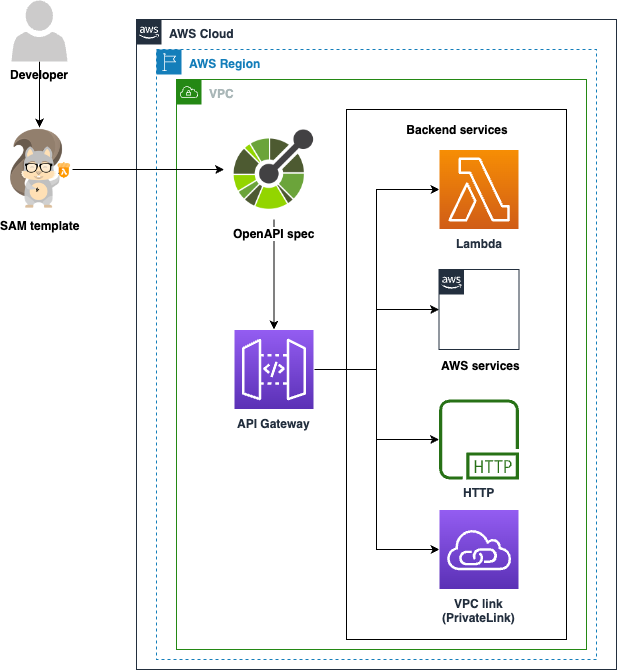
This diagram illustrates the process of creating a RESTful API on AWS using the OpenAPI specification without any coding. It also demonstrates how an OpenAPI spec file can be used by developers to define API configuration details such as paths, methods, schema, and responses, which will then be automatically translated into an API Gateway configuration.
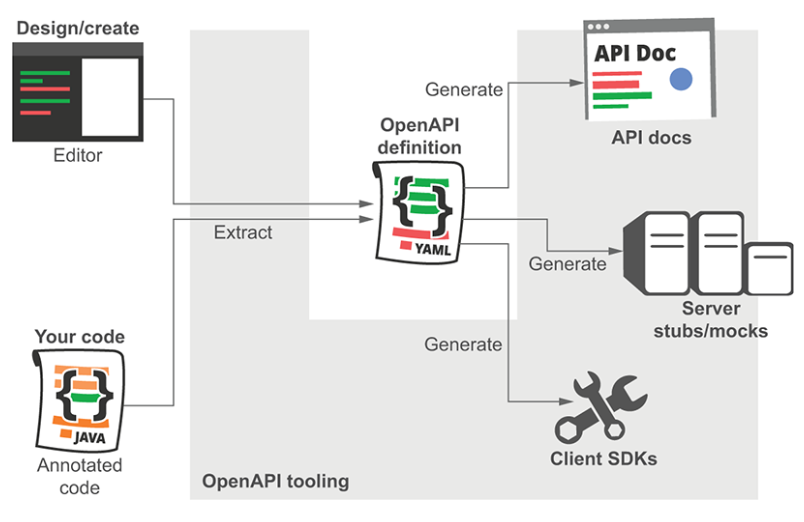
Going forward, we are encouraged to use the term “OpenAPI” to refer the heart of this ecosystem—the specification—and to use “Swagger” to refer to the specific set of tools managed by SmartBear (which includes Swagger UI, Swagger Editor, Swagger Parser, and at least a dozen more). Many, many other tools are also built to use OpenAPI.
Deploying the solution to AWS
let’s review some terminology and examine the process of creating a RESTful API on AWS.
- Serverless
- Technologies for running code, managing data, and integrating applications, all without managing servers.
- AWS SAM
- An open source framework for building serverless applications on AWS.
- AWS SAM template
- A shorthand YAML file to define AWS serverless resources, such as APIs, functions, databases, and event source mappings. This file defines your infrastructure as code.
- AWS Serverless Application Model Command Line Interface (AWS SAM CLI)
- A command line interface tool useful for building and deploying AWS serverless applications.
- Amazon API Gateway
- A fully managed service that makes it easy for developers to publish, maintain, monitor, and secure APIs with any business logic, or functionality from your back-end services. This includes applications that run on Amazon Elastic Compute Cloud (Amazon EC2), Amazon Elastic Container Service (Amazon ECS), or AWS Elastic Beanstalk, code that runs on AWS Lambda, or any web application. Amazon API Gateway handles all the tasks involved in accepting and processing up to hundreds of thousands of concurrent API calls, including traffic management, authorization and access control, monitoring, and API version management.
Create a SAM template
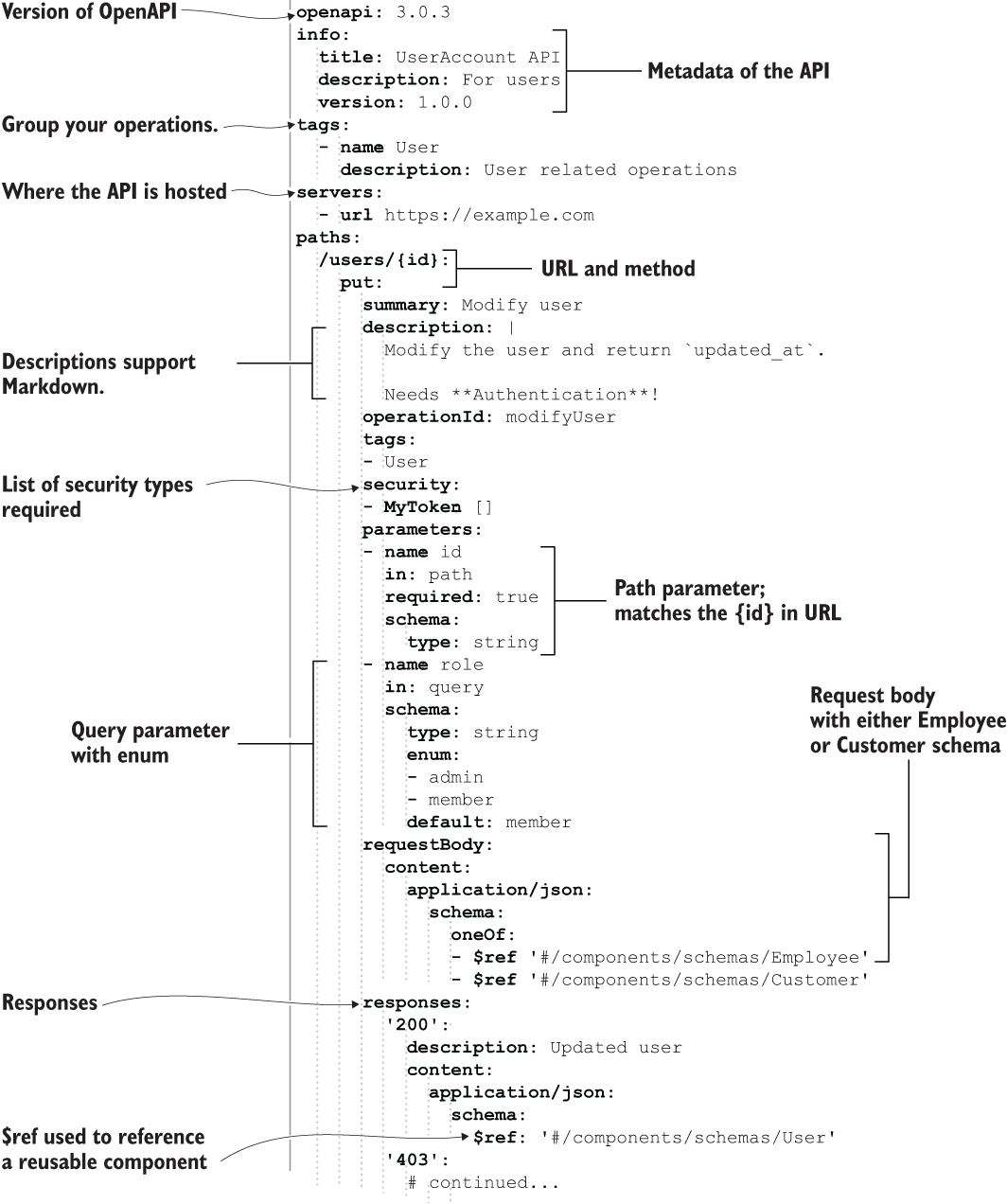
Here is an AWS SAM template that partially configures an API Gateway and includes the OpenAPI specification. To follow along with this tutorial, create a directory on your computer to hold the project files from this blog. Create a file in that directory called template.yaml and paste this content into it:
AWSTemplateFormatVersion: '2010-09-09'
Transform: 'AWS::Serverless-2016-10-31'
Description: Sports Equipment API
Globals:
Api:
OpenApiVersion: 3.0.3
Parameters:
environment:
Type: "String"
Default: dev
ipAddressWhiteList:
Type: "CommaDelimitedList"
Default: "myIpAddress/32"
Resources:
apiGateway:
Type: AWS::Serverless::Api
Properties:
Name: "sports-equipment"
StageName: !Sub "${environment}"
DefinitionBody:
x-amazon-apigateway-request-validators:
all:
validateRequestBody: true
validateRequestParameters: true
x-amazon-apigateway-request-validator: all
x-amazon-apigateway-policy:
Version: 2012-10-17
Statement:
- Effect: Allow
Principal: "*"
Action: execute-api:Invoke
Resource:
- arn:aws:execute-api:*:*:*/*/PATCH/*
- arn:aws:execute-api:*:*:*/*/POST/*
- arn:aws:execute-api:*:*:*/*/PUT/*
- arn:aws:execute-api:*:*:*/*/OPTIONS/*
- arn:aws:execute-api:*:*:*/*/GET/*
- arn:aws:execute-api:*:*:*/*/DELETE/*
Condition:
IpAddress:
aws:SourceIp: !Ref ipAddressWhiteList
#OPENAPI SPECIFICATION HERE
openapi: 3.0.3
info:
title: My Sports Equipment API
description: API operations of cataloging my sports equipment
version: v1.0
paths:
/equipment:
get:
summary: List all my sports equipment
responses:
'200':
description: Successful operation
content:
application/json:
schema:
type: array
items:
$ref: '#/components/schemas/Item'
post:
summary: Add a new equipment item to the catalog
requestBody:
content:
application/json:
schema:
$ref: '#/components/schemas/Item'
responses:
'200':
description: Successful operation
'400':
description: Invalid request
/equipment/{itemId}:
put:
summary: Update an equipment item to the catalog
requestBody:
content:
application/json:
schema:
$ref: '#/components/schemas/ItemData'
responses:
'200':
description: Successful operation
'400':
description: Invalid request
'404':
description: Not Found
delete:
summary: Delete an equipment item from the catalog
responses:
'200':
description: Successful operation
'404':
description: Not Found
components:
schemas:
ItemData:
type: object
required:
- name
- condition
- price
properties:
name:
type: string
example: rubber basketball
condition:
type: string
example: good
price:
type: number
format: currency
example: 5.99
Item:
allOf:
- type: object
required:
- id
properties:
id:
type: string
example: 1
- $ref: '#/components/schemas/ItemData'
Outputs:
ApiGatewayEndpoint:
Description: "API Gateway endpoint URL"
Value: !Sub "https://${apiGateway}.execute-api.${AWS::Region}.amazonaws.com/${environment}"
Deploy your API
To deploy this solution to an AWS account, use the AWS SAM CLI.
Here are the AWS SAM CLI prerequisites:
- Install AWS SAM CLI.
- Configure it with an AWS identity that has permissions to use API Gateway in the AWS account.
Once you have installed and configured the AWS SAM CLI, deploy your API from the command line by changing the current directory to where the AWS SAM template.yaml file is located. From there, execute the following command:
sam deploy --stack-name sports-equipment-api
At this point, you will see the API endpoint URL listed towards the bottom of the command’s output. It will look something like this: https://<api-id>execute-api.<region>.amazonaws.com/dev. Copy this URL, paste it into your browser, and add “/equipment” to the end of it. You should get a response from your API that shows the rubber basketball item we previously configured.
You may have seen sections in our AWS SAM template that begin with x-amazon-apigateway-request-validator. API Gateway can validate incoming requests based on the presence of required inputs and the structure of request bodies. We can demonstrate this functionality by making a valid POST request to create a new sports equipment item, and another POST where our item is missing certain required fields.
First, let’s simulate creating a new equipment item with the following curl command in your terminal. Note that you will need to update the endpoint URL to match your deployment.
curl -i -X 'POST' \
  'https://<api-id>.execute-api.<region>.amazonaws.com/dev/equipment' \
  -H 'accept: */*' \
  -H 'Content-Type: application/json' \
  -d '{
  "id": "2",
  "name": "golf ball",
  "condition": "new",
  "price": 0.20
}'
If you run this command, you should see an HTTP 200 success code returned. Now remove the ID and name fields from our request body. API Gateway should detect that this is an invalid request, since our JSON schema requires the ID and name fields to be present.
curl -i -X 'POST' \
  'https://<api-id>.execute-api.<region>.amazonaws.com/dev/equipment' \
  -H 'accept: */*' \
  -H 'Content-Type: application/json' \
  -d '{
  "condition": "new",
  "price": 0.20
}'
An HTTP 400 response code should appear, which indicates that the request was invalid.
References
https://github.com/aws-samples/cf-sam-openapi-file-organization-demo
https://github.com/openapistack/openapi-backend/tree/main/examples