Configuring event notifications using object key name filtering
To Nha Notes | July 4, 2023, 6:01 p.m.
Note
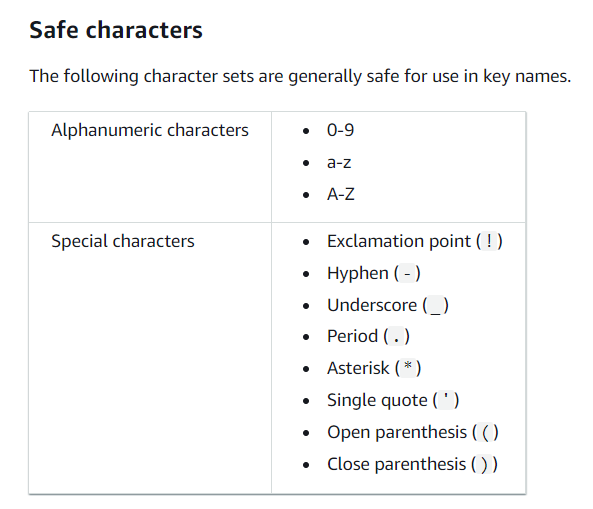
A wildcard character ("*") can't be used in filters as a prefix or suffix. If your prefix or suffix contains a space, you must replace it with the "+" character. If you use any other special characters in the value of the prefix or suffix, you must enter them in URL-encoded (percent-encoded) format. For a complete list of special characters that must be converted to URL-encoded format when used in a prefix or suffix for event notifications, see Safe characters.
Characters that might require special handling
The following characters in a key name might require additional code handling and likely need to be URL encoded or referenced as HEX. Some of these are non-printable characters that your browser might not handle, which also requires special handling:
-
Ampersand ("&")
-
Dollar ("$")
-
ASCII character ranges 00–1F hex (0–31 decimal) and 7F (127 decimal)
-
'At' symbol ("@")
-
Equals ("=")
-
Semicolon (";")
-
Forward slash ("/")
-
Colon (":")
-
Plus ("+")
-
Space – Significant sequences of spaces might be lost in some uses (especially multiple spaces)
-
Comma (",")
-
Question mark ("?")
Characters to avoid
Avoid the following characters in a key name because of significant special handling for consistency across all applications.
-
Backslash ("\")
-
Left curly brace ("{")
-
Non-printable ASCII characters (128–255 decimal characters)
-
Caret ("^")
-
Right curly brace ("}")
-
Percent character ("%")
-
Grave accent / back tick ("`")
-
Right square bracket ("]")
-
Quotation marks
-
'Greater Than' symbol (">")
-
Left square bracket ("[")
-
Tilde ("~")
-
'Less Than' symbol ("<")
-
'Pound' character ("#")
-
Vertical bar / pipe ("|")
References
https://docs.aws.amazon.com/AmazonS3/latest/userguide/notification-how-to-filtering.html