Amazon MWAA network architecture
To Nha Notes | Sept. 19, 2024, 9:31 a.m.
Amazon MWAA components
Amazon MWAA environments consist of the following four main components:
-
Scheduler — Parses and monitors all of your DAGs, and queues tasks for execution when a DAG's dependencies are met. Amazon MWAA deploys the scheduler as a AWS Fargate cluster with a minimum of 2 schedulers. You can increase the scheduler count up to five, depending on your workload. For more information about Amazon MWAA environment classes, see Amazon MWAA environment class.
-
Workers — One or more Fargate tasks that runs your scheduled tasks. The number of workers for your environment is determined by a range between a minimum and maximum number that you specify. Amazon MWAA starts auto-scaling workers when the number of queued and running tasks is more than your existing workers can handle. When running and queued tasks sum to zero for more than two minutes, Amazon MWAA scales back the number of workers to its minimum. For more information about how Amazon MWAA handles auto-scaling workers, see Amazon MWAA automatic scaling.
-
Web server — Runs the Apache Airflow web UI. You can configure the web server with private or public network access. In both cases, access to your Apache Airflow users is controlled by the access control policy you define in AWS Identity and Access Management (IAM). For more information about configuring IAM access policies for your environment, see Accessing an Amazon MWAA environment.
-
Database — Stores metadata about the Apache Airflow environment and your workflows, including DAG run history. The database is a single-tenant Aurora PostgreSQL database managed by AWS, and accessible to the Scheduler and Workers' Fargate containers via a privately-secured Amazon VPC endpoint.
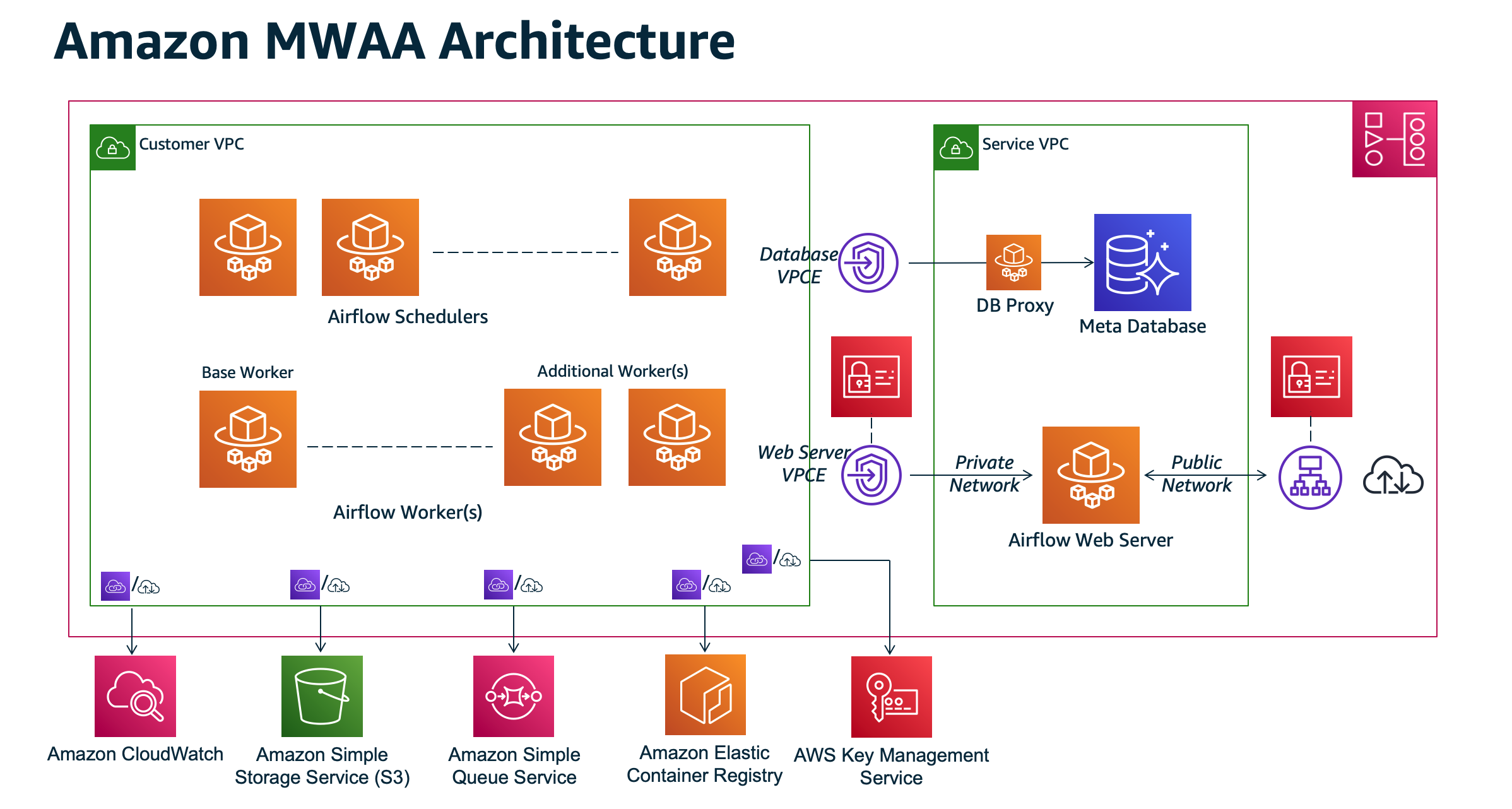
Note: The service Amazon VPC is not a shared VPC. Amazon MWAA creates an AWS owned VPC for every environment you create.
-
Amazon S3 — Amazon MWAA stores all of your workflow resources, such as DAGs, requirements, and plugin files in an Amazon S3 bucket. For more information about creating the bucket as part of environment creation, and uploading your Amazon MWAA resources, see Create an Amazon S3 bucket for Amazon MWAA in the Amazon MWAA User Guide.
-
Amazon SQS — Amazon MWAA uses Amazon SQS for queueing your workflow tasks with a Celery executor.
-
Amazon ECR — Amazon ECR hosts all Apache Airflow images. Amazon MWAA only supports AWS managed Apache Airflow images.
-
AWS KMS — Amazon MWAA uses AWS KMS to ensure your data is secure at rest. By default, Amazon MWAA uses AWS managed AWS KMS keys, but you can configure your environment to use your own customer-managed AWS KMS key. For more information about using your own customer-managed AWS KMS key, see Customer managed keys for Data Encryption in the Amazon MWAA User Guide.
-
CloudWatch — Amazon MWAA integrates with CloudWatch and delivers Apache Airflow logs and environment metrics to CloudWatch, allowing you to monitor your Amazon MWAA resources and troubleshoot issues.
References
https://docs.aws.amazon.com/mwaa/latest/migrationguide/mwaa-architecture.html