AI Accelerators
To Nha Notes | Feb. 25, 2025, 2:53 p.m.
How fast and cheap software can run depends on the hardware it runs on. While there are optimization techniques that work across hardware, understanding hardware allows for deeper optimization.
The development of AI models and hardware has always been intertwined. The lack of sufficiently powerful computers was one of the contributing factors to the first AI winter in the 1970s.
What’s an accelerator?
An accelerator is a chip designed to accelerate a specific type of computational workload. An AI accelerator is designed for AI workloads. The dominant type of AI accelerator is GPUs, and the biggest economic driver during the AI boom in the early 2020s is undoubtedly NVIDIA.
The main difference between CPUs and GPUs is that CPUs are designed for general-purpose usage, whereas GPUs are designed for parallel processing:
-
CPUs have a few powerful cores, typically up to 64 cores for high-end consumer machines. While many CPU cores can handle multi-threaded workloads effectively, they excel at tasks requiring high single-thread performance, such as running an operating system, managing I/O (input/output) operations, or handling complex, sequential processes.
-
GPUs have thousands of smaller, less powerful cores optimized for tasks that can be broken down into many smaller, independent calculations, such as graphics rendering and machine learning. The operation that constitutes most ML workloads is matrix multiplication, which is highly parallelizable.
While the pursuit of efficient parallel processing increases computational capabilities, it imposes challenges on memory design and power consumption.
The training demands much more memory due to backpropagation and is generally more difficult to perform in lower precision. Furthermore, training usually emphasizes throughput, whereas inference aims to minimize latency.
Consequently, chips designed for inference are often optimized for lower precision and faster memory access, rather than large memory capacity. Examples of such chips include the Apple Neural Engine, AWS Inferentia, and MTIA (Meta Training and Inference Accelerator). Chips designed for edge computing, like Google’s Edge TPU and the NVIDIA Jetson Xavier, are also typically geared toward inference.
There are also chips specialized for different model architectures, such as chips specialized for the transformer.16 Many chips are designed for data centers, with more and more being designed for consumer devices (such as phones and laptops).
A chip’s specifications contain many details that can be useful when evaluating this chip for each specific use case. However, the main characteristics that matter across use cases are computational capabilities, memory size and bandwidth, and power consumption.
Computational capabilities
Computational capabilities are typically measured by the number of operations a chip can perform in a given time. The most common metric is FLOP/s, often written as FLOPS, which measures the peak number of floating-point operations per second. In reality, however, it’s very unlikely that an application can achieve this peak FLOP/s. The ratio between the actual FLOP/s and the theoretical FLOP/s is one utilization metric.
The number of operations a chip can perform in a second depends on the numerical precision—the higher the precision, the fewer operations the chip can execute. Think about how adding two 32-bit numbers generally requires twice the computation of adding two 16-bit numbers. The number of 32-bit operations a chip can perform in a given time is not exactly half that of 16-bit operations because of different chips’ optimization.
Memory size and bandwidth
Because a GPU has many cores working in parallel, data often needs to be moved from the memory to these cores, and, therefore, data transfer speed is important. Data transfer is crucial when working with AI models that involve large weight matrices and training data. These large amounts of data need to be moved quickly to keep the cores efficiently occupied. Therefore, GPU memory needs to have higher bandwidth and lower latency than CPU memory, and thus, GPU memory requires more advanced memory technologies. This is one of the factors that makes GPU memory more expensive than CPU memory.
To be more specific, CPUs typically use DDR SDRAM (Double Data Rate Synchronous Dynamic Random-Access Memory), which has a 2D structure. GPUs, particularly high-end ones, often use HBM (high-bandwidth memory), which has a 3D stacked structure.17
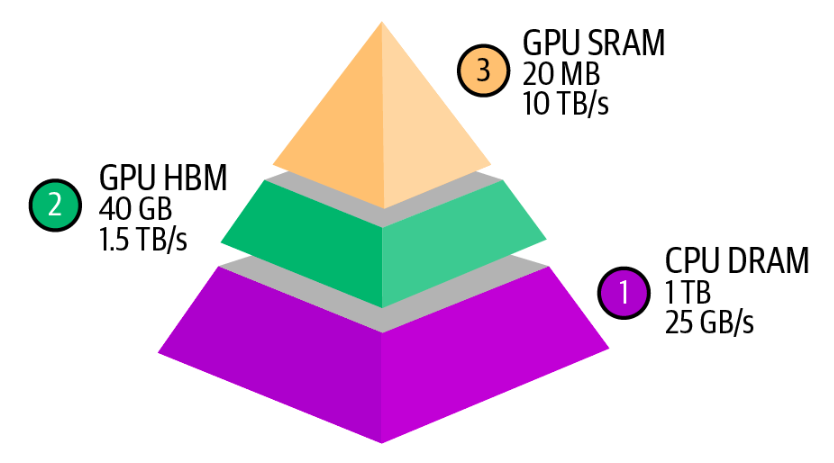
An accelerator’s memory is measured by its size and bandwidth. These numbers need to be evaluated within the system an accelerator is part of. An accelerator, such as a GPU, typically interacts with three levels of memory, as visualized in below fiture.
Power consumption
Chips rely on transistors to perform computation. Each computation is done by transistors switching on and off, which requires energy. A GPU can have billions of transistors—an NVIDIA A100 has 54 billion transistors, while an NVIDIA H100 has 80 billion. When an accelerator is used efficiently, billions of transistors rapidly switch states, consuming a substantial amount of energy and generating a nontrivial amount of heat. This heat requires cooling systems, which also consume electricity, adding to data centers’ overall energy consumption.
Chip energy consumption threatens to have a staggering impact on the environment, increasing the pressure on companies to invest in technologies for green data centers. An NVIDIA H100 running at its peak for a year consumes approximately 7,000 kWh. For comparison, the average US household’s annual electricity consumption is 10,000 kWh. That’s why electricity is a bottleneck to scaling up compute.
Selecting Accelerators
What accelerators to use depends on your workload. If your workloads are compute-bound, you might want to look for chips with more FLOP/s. If your workloads are memory-bound, shelling out money for chips with higher bandwidth and more memory will make your life easier.
When evaluating which chips to buy, there are three main questions:
-
Can the hardware run your workloads?
-
How long does it take to do so?
-
How much does it cost?
FLOP/s, memory size, and memory bandwidth are the three big numbers that help you answer the first two questions. The last question is straightforward. Cloud providers’ pricing is typically usage-based and fairly similar across providers. If you buy your hardware, the cost can be calculated based on the initial price and ongoing power consumption.
References
Referenced in the AI Engineering ebook by Chip Huyen